

Minimizing Documentation
I recently attended an STC chapter presentation on interface design, and the speaker, Grant Skousen, showed us the following graphic.
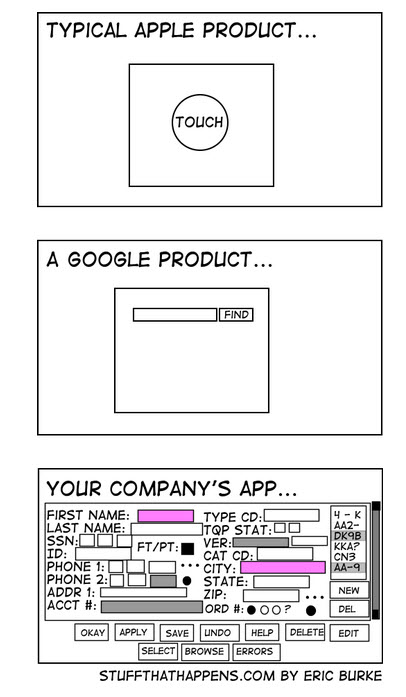
We then launched into a discussion about minimalism. I think we all agree that minimalism in user interfaces is an increasing trend, especially with the success of the iPod and iPhone, which are all about simplicity and minimal design.
Grant said every time you add something to an interface, you should take something away. Keeping the interface simple ensures you aren't crowding out screen real estate. He then quoted Elder M. Russell Ballard, who said:
To innovate does not necessarily mean to expand; very often it means to simplify.
If you just keep adding components to the interface, your core features get diluted, Grant said.
I asked Grant if the same principles of minimalism in interface design also applied to help materials. No doubt you've heard some say that you don't have to document everything.
Grant wasn't sure if it applied. Minimalism in documentation does have a similar effect as minimalism in design, though. Cutting out the extraneous text, unnecessary diagrams, and edge-case videos reduces content dilution. Your users can focus on the key help material that matters and that you want to be sure they read.
Is less always more? I'm not sure. But if Apple's minimalistic designs are any indicator of trends, minimalism in documentation is something to pay attention to. Here are five ideas for minimizing documentation:
1. Make the interface simpler.
If you can fix a confusing interface design or workflow, you can reduce the need for excessive instructions. This is the ideal solution to minimizing documentation, but it requires you to get involved in the development process early on, when you're at the prototype stage. At times you have to present your case like a lawyer, bringing the evidence of user feedback and metrics to persuade project managers and designers to change the prototypes.
2. Make the help context-sensitive.
If you can present the user with help specific to the page or task at hand, this reduces the perceived amount of documentation that the user encounters. This may not reduce how much text you write. In fact, it may increase it. But from a user's point of view. he or she won't have to browse through long tables of contents or search for the right topic. The help is essentially just one page, right there (hence, minimal).
Sponsored
3. Give users a quick reference guide.
You can give users a short quick reference guide (under five pages). This gets the user up and running with the system. Quick reference guides reduce the instruction for the system to the core tasks and presents those instructions in an abbreviated, concise way. If the user needs more information, point him or her to a full database or online help file where or she can search for answers.
4. Reuse content topics and paragraphs.
If you can reuse the same material for multiple guides, this reduces the amount of documentation you have to write. Especially if you're writing a manual for several different versions of a product, or role-based guides for different groups of people, or translating your guide into multiple languages, the more you can reuse paragraphs, chunks, and topics, the less documentation you have to manage.
5. Add to the documentation when users request the information.
Don't fall prey to the mindset that every scenario, problem, and possible use of the application needs documentation. If you set yourself this task, you may be writing hundreds of topics for what is otherwise a relatively simple application. Instead, decouple the help content from the application so you can update it on the fly. Monitor support logs, analyze metrics, and listen to other user feedback. When users ask questions not included in the help, add that topic to the help. This is a living documentation model. The documentation grows to the size it needs to grow, and no larger.
Conclusion
Minimalism in documentation is a growing trend. Recently Chrysler even abandoned their long manuals in favor of shorter guides and DVDs. What are your strategies for minimizing documentation?
About Tom Johnson

I'm an API technical writer based in the Seattle area. On this blog, I write about topics related to technical writing and communication — such as software documentation, API documentation, AI, information architecture, content strategy, writing processes, plain language, tech comm careers, and more. Check out my API documentation course if you're looking for more info about documenting APIs. Or see my posts on AI and AI course section for more on the latest in AI and tech comm.
If you're a technical writer and want to keep on top of the latest trends in the tech comm, be sure to subscribe to email updates below. You can also learn more about me or contact me. Finally, note that the opinions I express on my blog are my own points of view, not that of my employer.