

WordPress Tip: Section Widget and Advanced XML Export -- wordpress Plugin Winner and Runner Up
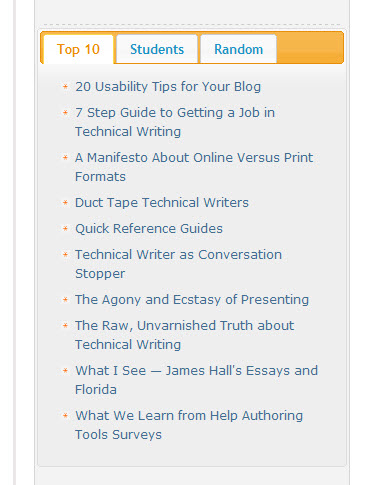
The winner of the latest WordPress plugin competition is the Section Widget by Godfrey Chan. I was exploring it yesterday, and I've got to say, it's one super cool widget. Look in the lower-right corner of my sidebar to see it in action.
The Section Widget provides a tabbed widget, first of all. On each of the tabs, you can type your own text or code. You can also choose from one of about 20 different styles. And you can apply logic to the widget's appearance in your blog, so you can set it to display only on certain categories, pages, or sections.
I like the tabbed widget because it allows me to display content in a compressed way -- content that would otherwise be buried in my archives. I chose to add two custom bookmark lists and one list of random posts. (I chose the posts in my bookmark lists rather quickly -- one tab shows my top 10 or so, another contains posts oriented for students.)
I did have a little trouble getting the Section Widget installed. It seems to take a lot of memory, so you may have to disable your other plugins first (if you run into trouble).
Sponsored
The two runner up plugins are Advanced Export for WP and WPMU, and Live Blogging. The Advanced Export is quite useful as well because although you can export your posts from WordPress using the built-in exporter (Tools > Export), the file is usually larger than 2 MB, which is problematic. When you try importing an XML file larger than 2 MB into another WordPress installation, the PHP rules block it because of a standard 2 MB limit.
To get around the limit, you have to install a php.ini file (which controls how your server's PHP handles scripts) in your file directory, and then tweak a few limits within that file. In my experience, tweaking the php.ini file is anything but intuitive and sometimes doesn't work. It's much easier to just export about 7-8 separate XML files (broken up by date) and then upload them individually.
As for the Live Blogging plugin, I don't have a use for it, but if you're attending a live event or updating scores for a football game, it might be useful.
About Tom Johnson

I'm an API technical writer based in the Seattle area. On this blog, I write about topics related to technical writing and communication — such as software documentation, API documentation, AI, information architecture, content strategy, writing processes, plain language, tech comm careers, and more. Check out my API documentation course if you're looking for more info about documenting APIs. Or see my posts on AI and AI course section for more on the latest in AI and tech comm.
If you're a technical writer and want to keep on top of the latest trends in the tech comm, be sure to subscribe to email updates below. You can also learn more about me or contact me. Finally, note that the opinions I express on my blog are my own points of view, not that of my employer.