


Discovering Relationship Tables
Lately I've been creating context-sensitive help for an online application. As part of my strategy, I've been trying to follow Theresa Putkey's advice in "Usability in Context-Sensitive Help." In her article, Theresa recommends providing more than just the steps for a specific task in the context-sensitive help window. Instead, she says to show more contextual links, including answers to why, when, and who questions, because too frequently the user who searches for help may have needs outside the specific task you describe.
Theresa explains,
The traditional way of providing content in a context-sensitive help link has been to link to the procedure for the page. Not only can this be limiting for the user, but it also can be limiting for the writer and the company. By picking a specific procedure, the writer is guessing at what the user wants to do on the page. While usability testing would give us more insight, if we don't have this option, we can make the context sensitive help link more applicable to more people by providing a link to both a How topic and the Why, When, and Who information.
If we don't provide additional options in the context-sensitive help, we are, in effect, making it more difficult for users to have their questions answered. By forcing them to browse and search through a help system they may be unfamiliar with, and by not highlighting the various options available for that screen, window, or page, we limit the options for the user and perhaps contribute to higher support costs.
To provide a variety of links to the user, you can manually list them, which is tedious and prone to error. Or you can use something like Related Links or Concept Links, which shows a list of links in a hard-to-see pop-up. However, there's also another option: relationship tables. I'm new to this concept, but my initial experience with them has gotten me excited.
Relationship tables come from the world of DITA, but Madcap now gives you the ability to create them in Flare 5. From one table you can manage all the related links for your entire project. Although you can define exclusions and inclusions, basically links in the same row are part of a family, and that family can appear on each topic that you embed the relationship table on.
For example, in the following table, I have four columns.
| Concept | Task | Reference | |
| Plugins | About Plugins | Installing Plugins
Editing Plugins Removing Plugins |
Lists of Recommended Plugins |
| Themes | About Themes
Theme Hierarchy Columns in Themes |
Installing Themes
Modifying Theme Stylesheets Customizing Theme Categories |
Best Magazine Themes |
After inserting a relationship table proxy into your Flare masterpage, and setting each link type as a "Family" link type, here's what automatically shows up on each page.
On all the plugins pages, you'll see the following:
Related Concepts
- About Plugins
Related Tasks
- Installing Plugins
- Editing Plugins
- Removing Plugins
Reference Reference
- Lists of Recommended Plugins
Note: If you're viewing the Installing Plugins page, the Installing Plugins doesn't appear in the list of links. (The same smart exclusion isn't true of Flare's Concept links.)
On the themes pages, the list of related links would look like this:
Related Concepts
- About Themes
- Theme Hierarchy
- Columns in Themes
Related Tasks
- Installing Themes
- Modifying Theme Stylesheets
- Customizing Theme Categories
Reference Topics
- Best Magazine Themes
The cool thing is that you can manage all your related links from this one table. You can also specify more details with relationship tables, such as having links only appear on certain pages and targets, and applying conditional tags. But the basic concept is simple.
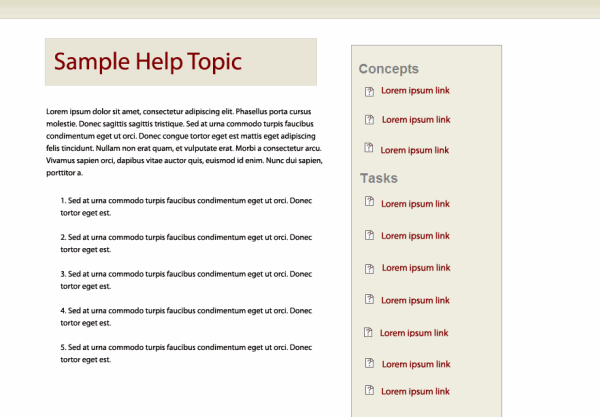
I've even styled my relationship table links so that they float in a narrow side column to the right of the main topic. My approach for context-sensitive help is to list the most common task for the page in the main column, and then provide the list of related links in a sidebar on the right. If the user clicks the help and says, no, that's not what I want, he or she won't need to scroll down to the end to see related topics.
For more information on relationship tables in Flare, see About Relationship Tables in Flare's help.
About Tom Johnson

I'm an API technical writer based in the Seattle area. On this blog, I write about topics related to technical writing and communication — such as software documentation, API documentation, AI, information architecture, content strategy, writing processes, plain language, tech comm careers, and more. Check out my API documentation course if you're looking for more info about documenting APIs. Or see my posts on AI and AI course section for more on the latest in AI and tech comm.
If you're a technical writer and want to keep on top of the latest trends in the tech comm, be sure to subscribe to email updates below. You can also learn more about me or contact me. Finally, note that the opinions I express on my blog are my own points of view, not that of my employer.