

Translating with the New Madcap Lingo V2
This article is a guest post by Daniel Ng. Daniel is part of a small team with an in-house translator. They translate their own English Flare help projects to Simplified Chinese with Madcap Lingo and have been using Madcap Lingo since version 1.

Madcap Lingo is Madcap's offering in the XML-based translation authoring solution space. As a translation memory system, Madcap Lingo helps translators speed up and simplify the translation process of Madcap Flare/Blaze projects into another language. Established translation tools include SDL Trados, Transit, Wordfast, and Alchemy Catalyst. Measured against these, Lingo is relatively young.
Translations are stored in a SQL Server Express database. Translation memory goes beyond saving time; it improves accuracy of future translations by retaining a history of used segments. The more you translate with translation memory, the easier and better it becomes progressively. If you have been doing regular translation work of your Flare/Blaze documentation or outsourced translation work, you owe it to yourself to give Madcap Lingo a try at least.
Version 1, released in late 2007, was notable for its Google translate integration, the ability to translate strings/callouts embedded in Capture screenshots, "diffing" of past projects, and simplified translation tracking.
This release is important because it overcomes some of the immediate shortcomings of the earlier release, such as the following:
- Lack of any translation memory editor (segments would be uploaded into a non-user-editable black box)
- Inability to handle partially translated projects (resulting in occasional crashes and minor stability issues)
- Limitations to Madcap Flare/Blaze/Mimic project file types (not handling other non-Madcap Software projects)
More file type support
This version follows in the current trend of future Madcap releases by unveiling brand-new DITA file support. I did not try this, due to our inability to source DITA files at the time.
At last, you can now start "Microsoft Word-only" translation projects, and you don't even need Flare at all. All you have to do is choose the Word document you want translated. Use your translation memory, Google translate, or translate it manually. When you're done, export it back out to Word. The exported Word document is remarkably pristine, with styles, text boxes, formatting structures, and tables very much intact.
In a bit of mischief, I embedded objects such as textboxes, words in frames, and formatted WordArt objects. I was expecting a crash of sorts and that Lingo would limp, sputter, and give up. It didn't. Interestingly, only the formatted WordArt objects did not translate. Amazing. For translators without any other specialist translation tools, this ultimately means you can finally leverage your effort in Madcap Lingo's translation database.
Sponsored
In any case, most day-to-day translation efforts start small, as simple Word documents. After all, in any company, with multiple Engineering, HR, and Marketing groups, Microsoft Word is remarkably flexible for creating technical documentation, labels, greeting cards, marketing collateral, reports, and brochures, all of which are "translation candidates" at some point.
This makes it a much more compelling option for companies or freelancers seriously considering a more versatile translation memory tool.
Nevertheless, comparisons are inevitable. Madcap Lingo's third party file support is comparatively limited. It doesn't translate PowerPoint files, InDesign projects, Visio diagrams, PhotoShop files, SQL Databases, C# resource files, or Wordpress blogs (not that anyone else does!), but still it's a big step.
Since its still a version 2 release, its not too far fetched to imagine that support could include even more file types in future versions. The current version translates XML files.
Alignment and fuzzy matches
Another big feature in version 2 is alignment. For partially translated projects, the new segment alignment lets you match, move translation segments around, and then upload them into translation memory. Already translated part of a project in Flare? Create a new alignment project, and soon you'll be swapping segments, moving, joining, and splitting segments.
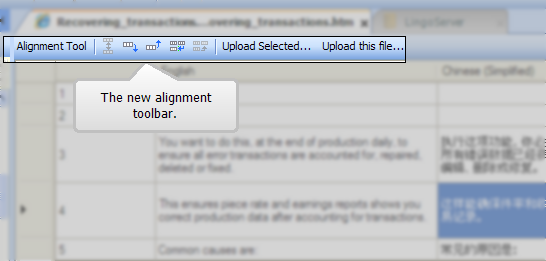
With shortcuts and multiple selections, the entire process is quick and easy. Initial fuzzy match processing of segments that Madcap Lingo does beforehand is quite commendable as well.
Version 2 improves on overall stability, especially when you can now open partially translated documents and projects. Anyone with earlier versions who has ever attempted manual alignments with partially translated sources may understand some of the frustration.
Lingo in a Beta state was not prepped for real production work yet.
Translation memory editor
And finally, you can now edit all those uploaded segments in the translation database.
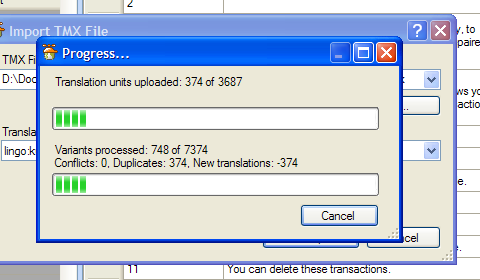
To put things in perspective, a medium-sized Flare translation project can easily generate close to 10,000 segments, as it did for one of ours.
The designers thoughtfully placed a Search button so that when terminology standards are established, you can simply search, edit, and replace suggestions in memory immediately through the new editor. Although standard in common translation enterprises, if you don't have one, Madcap Lingo now gives you a quick start in setting one up.
All the standard v1 features remain unchanged in Lingo. As this post was made based on a beta pre-release version of the product, there were some minor issues, which will probably be removed by the time of release. Nonetheless, this new release offers technical communicators a much stronger case for employing a specialized translation tool in technical publications if you haven't considered one before.
As time of this post, Madcap Lingo version 2 (not the pre-release version) is now available to download from the Madcap Software site and should be worth your consideration.
About Tom Johnson

I'm an API technical writer based in the Seattle area. On this blog, I write about topics related to technical writing and communication — such as software documentation, API documentation, AI, information architecture, content strategy, writing processes, plain language, tech comm careers, and more. Check out my API documentation course if you're looking for more info about documenting APIs. Or see my posts on AI and AI course section for more on the latest in AI and tech comm.
If you're a technical writer and want to keep on top of the latest trends in the tech comm, be sure to subscribe to email updates below. You can also learn more about me or contact me. Finally, note that the opinions I express on my blog are my own points of view, not that of my employer.