


Documentation Honesty and Poor User Interfaces -- An Ethical Dilemma?
Rilynn from New England writes,
Tom,
I notice that a lot of companies use release notes to post a list of defects (bug) that were fixed with the corresponding software release. This is something that I appreciate as a software user. I realize that I'm not the user of my company's products, though. Also, management at my company is really against adopting this practice, seeing it as "airing our dirty laundry."
This bleeds over to more general areas as well. For example, I was asked to write a short document to help our users with a task in our software that was, admittedly, not well executed. In certain scenarios, the user had a couple of options that were really more "workarounds," and neither was terribly elegant. My initial approach was very matter-of-fact and forthright, explaining the pros & cons of each approach. I got some feedback that ultimately lead to me softening the language significantly, to the point that I think the document wasn't' as straightforward in helping the user make the decision about which path was right for them.
What do you think? Have you had any similar situations? Do you think most users these days appreciate a more forthright, honest approach, or are they apt to use documentation of our products' shortcomings against us?
Excellent question. Let me tackle this in two parts.
Apologies and Insults for Poor User Interfaces
We've all run in to situations where we have to document poor user interfaces. As much as we complain and suggest improvements, the project manager decides to go ahead with the interface as is because redesigning it is too costly.
When I run into these situations, rather than insult the interface in straightforward talk in the documentation, I euphemize the language (against my better desires) in order to maintain the consistency of the company voice. It just doesn't sound right to be so frank.
For example, perhaps you have a button in your application that does absolutely nothing, and the developers don't feel it's a high enough priority to remove. Rather than say, "The X button does absolutely nothing -- it was a low-priority in the design to remove it," you can write something like:
The X icon in the upper-right corner of the pane does not apply to the pane nor to the tabs in the main window. The X icon is an unnecessary carry-over from the pane's fly-out functionality and could not easily be removed.
I don't know if that's too straightforward, but it maintains the corporate voice without slipping into insults. However, sometimes the issue is more severe.
For example, on an application I document, I realized, about a month after the release, that the home page was missing a critical link to a step in a common process. A confused, upset customer brought it to my attention. My help instructions described a different approach for completing the same process. Should I add a note in the help, warning users that following the steps on the home page, as the application was partly designed to accommodate, would result in confusion and misinformation?
This situation points to an interesting predicament. As technical writers, we play on both teams during the same game. On the one hand, we're champions for the users, arguing for usability, simplified steps, and a friendly computer experience. On the other hand, we're also members of the project team, responsible for presenting the voice of the team. When the interface requires an honesty that will put the project team in an uncomfortable light, the only solution is a careful rhetorical explanation that blends euphemism, apology, and alternate options.
Of course, if you're writing a third-party how-to book, you have an open license to insult the application as much as you want. I routinely see this in For Dummies books and others where the author does not represent the project team company. In fact, one appeal of these books is the author's open, unrestricted voice.
You can also be abnormally straightforward if you work for a company that has an anti-corporate flair. For example, in a previous version of WordPress, some help text in the UI says the following:
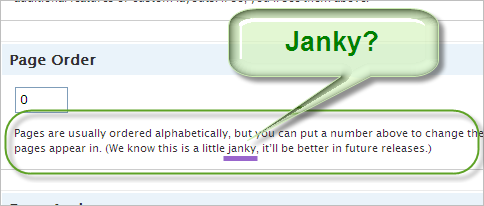
But unless you fit into one of these two situations, you'll find yourself writing and rewriting those sentences in your documentation, balancing honesty and team voice in difficult ways.
Listing Bugs in Release Notes
You also asked whether teams should list, in release notes, all bugs they fixed. Snagit recently released version 9.1. The first thing I did was look to see if they fixed a little bug that happens when you manually stretch a selection. Sure enough, they did. I was ecstatic. But the fixed bug wasn't listed anywhere on their release notes (at least the ones I saw).
Perhaps they hoped the majority would never know about the bug. They probably fixed a dozen other bugs I wasn't aware of. Does "airing their dirty laundry," as you phrase it, suddenly awaken users to the fact that there are a lot of bugs, instability, and other issues in the application they trust?
Maybe a little. Many users assume that officially published releases of commercial software are bug-free. But that's not the case for either commercial or in-house applications. In one application we have at work, there are scores of bugs in the production version -- but you'd have to ask a QA engineer to find them all. Most are extremely subtle and only occur in rare circumstances.
Although I don't have any research to stand on, I think it's a good practice to list all the bugs you've fixed (to an extent). The long list of little bugs can be a separately referenced document, almost a footnote in the main release notes. Something like, "In addition to these new features, numerous other bugs and issues have been fixed." With "bugs and issues," you can link the text to a long document listing all the fixed bugs. In addition to the benefits of complete disclosure, writing a comprehensive list of fixes will make you aware of changes you may have missed.
Do you run into ethical dilemmas involving honesty and documentation? How do you handle it?
About Tom Johnson

I'm an API technical writer based in the Seattle area. On this blog, I write about topics related to technical writing and communication — such as software documentation, API documentation, AI, information architecture, content strategy, writing processes, plain language, tech comm careers, and more. Check out my API documentation course if you're looking for more info about documenting APIs. Or see my posts on AI and AI course section for more on the latest in AI and tech comm.
If you're a technical writer and want to keep on top of the latest trends in the tech comm, be sure to subscribe to email updates below. You can also learn more about me or contact me. Finally, note that the opinions I express on my blog are my own points of view, not that of my employer.