

Announcing WriterRiver.com, a Digg-like Social News Site for Technical Communicators
Update: I have since revised the writerriver.com site with a different implementation. This new version is more like Twitter than Digg. The concepts are still mostly the same, except there's no voting.
I've been a long-time reader of Digg.com, but just last week it dawned on me that it would be really great if there were a Digg-like site for technical communication. So I decided to create one. It's called WriterRiver.com and it's pretty much a Digg clone, except that the entire focus is on articles related to technical communicators.
Check it out by clicking the image below.

How It Works
When you read something interesting online, you can submit the article's link to WriterRiver.com through the Submit a Story tab. Everything that looks like a post on WriterRiver.com is really just a link to an article online.
When you initially submit an article/story, it appears on the Upcoming Stories tab. As other readers check out the article and vote on it -- by clicking the Float link -- the vote count for that article increases.
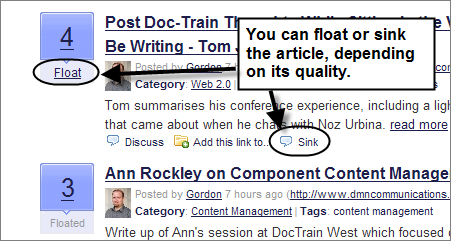
Notice how the word "Floated" appears grayed out in the lower voting button? That's because I already floated on the article.
When enough people float an article (in this case, when an article receives 5 floats), it automatically moves to the Front Page Stories tab, which is the main page. Conversely, if you dislike the article, you can decrease its votes by clicking Sink. (Float and sink tie in with the river metaphor. On Digg.com, you digg or bury stories.)
Filtering By Popularity
More floats make the article more visible, and fewer votes (or more sinks) make the article harder to find. In the upper-right corner of the site, you can sort the articles by popularity. You can see the most popular articles (the articles with the most votes) today, this week, this month, or this year.

Tip: Set your browser's home page to show the Upcoming Stories or some other filter. It will help you keep up with the stream of articles.
Other Implications
A few days ago I wrote a post saying I wanted to try a new path. I was mostly referring to my podcast and how tired I was getting of the interview format. The creators of Digg have a companion podcast called Diggnation, in which they discuss the most dugg/voted stories on Digg.com. The format seems to work well — stories submitted to Digg provide endless discussion for the podcast. The Slashdot Review is also a popular podcast based on the top social news sites.
I think that staying updated with the news is one of main reasons people listen to podcasts. I hope to make my Tech Writer Voices podcast more like Diggnation, Slashdot Review, and This Week in Tech. (For this, I'll need a couple of regular co-hosts, so if you're interested, email me.)
Pligg: The Tool Behind the Scenes
After looking at the WriterRiver.com site, you might be wondering, Tom, where did you get all the time to create this site? Well, WriterRiver.com is made using Pligg, which is a Digg clone tool. Pligg powers such sites as meaname.com (Spanish version of Digg), Kirtsy (a female-focused Digg clone), and a host of other social news sites. Pligg is easy to install and fairly robust (although it could really use a heftier user manual).
Sponsored
Let Others Know
Like any social news site, WriterRiver's success depends on how many people use it. In an effort to promote WriterRiver.com, please consider writing a post about it, relaying the announcement on any listserv you're on, or adding a link to your sidebar. It's also the kind of site that works well as a home page for your browser (for example, you could set your home page to show the Top Stories today). The more people who submit and vote, the better the content becomes.
The Metaphor Behind "WriterRiver"
Why the name WriterRiver? Dave Winer, the guy who invented RSS, has a metaphor about a "river of news" that I'm partly using. Imagine yourself sitting beside a river watching the driftwood, sticks, fish, brush, eddies, paper cups, toy boats, etc., float by. The river naturally provides a constant stream of new content that moves along in a mesmerizing way. At any time you can reach in and grab something, bring it to the surface ("float it") so you can inspect it for a while, and then send it back down the river.
Results I'm Hoping for
I hope that WriterRiver.com moves the tech comm. blogosophere and other online formats forward. Through WriterRiver.com we'll showcase the most engaging articles and posts that 300+ technical writers and bloggers are actively churning out. I have a bucketful of RSS feeds that I scan through each day, and I plan to highlight the good posts in a way that makes them easily findable by others.
I also think the aggregation of the most engaging posts or articles will prove the value of the blogosphere. Certainly the articles posted on WriterRiver.com don't need to come from blogs, but I'm betting that a good majority will. When others begin to feel the power and addiction of a well-written blog post, it will motivate more writers to start blogs and to follow them. It will also allow new writers to more quickly find reader communities, and it will enable new readers to find engaging writers.
If you have any feedback about the site, I'd love to hear it. Mostly, I'd like to see you submit article links to content you find interesting, and vote on those articles you like.
Thanks for trying this out with me.
About Tom Johnson

I'm an API technical writer based in the Seattle area. On this blog, I write about topics related to technical writing and communication — such as software documentation, API documentation, AI, information architecture, content strategy, writing processes, plain language, tech comm careers, and more. Check out my API documentation course if you're looking for more info about documenting APIs. Or see my posts on AI and AI course section for more on the latest in AI and tech comm.
If you're a technical writer and want to keep on top of the latest trends in the tech comm, be sure to subscribe to email updates below. You can also learn more about me or contact me. Finally, note that the opinions I express on my blog are my own points of view, not that of my employer.