


Using WordPress to Build Websites Instead of Blogs
One of the things I like about WordPress is its versatility. WordPress isn’t just blogging software. With the right theme, you can build a website that doesn’t resemble a blog at all. Essentially, writers who become familiar with WordPress become empowered as web designers as well.
A few weeks ago, I made a website for a client who was launching a green building business (see or click the image below).
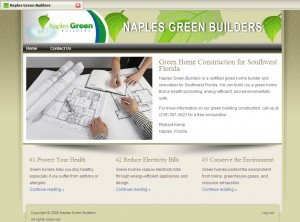
It’s a predesigned theme that I purchased from ithemes.com, customized a bit and configured. I also wrote the content. I like WordPress because you don’t have to start from scratch with the theme design. If you get a system down and are familiar with the theme you’re implementing, you can create a professional site fairly quickly.
However, if you undertake such a project, triple the time you estimate for your first project, because it just works out that way. (Also, as always, the writing of the content is often more difficult than the actual site creation.)
My point is basically that WordPress doesn’t just have to look like a blog. It’s a micro-CMS that also empowers less technical users to control and manage the text on the pages without using Notepad or Dreamweaver.
Like this post? Subscribe to the RSS feed
.
Related Posts
- Wordpress releases first official Wordpress Multi-User Edition
- FTCC launches its site and call for entries today
- Embedding an Audio Player into Your Site Without WordPress
- Answering Questions on the “Practicalities of Blogging”
- The Concept of Trackbacks
Tags: Web Design, WordPress

Podcast in iTunes
Follow me on Twitter

May 5th, 2008 at 11:11 am
Now my site is the worst example of this however I have been seeing more and more clients using Wordpress to design their corporate sites. They are beginning to see the value in “Pages” bases creation of content versus “complete uploads in dreamweaver”. I wont spam you in here unless you wish me to but the results have been satisfying and effective.
May 5th, 2008 at 3:02 pm
Nice article.
What you can also do, depending on the company, is make a section for newsletters. These are essentially blog posts but not as frequent and you could us an offline editor for non-techies.
Next, hook the RSS feed up through feedburner and put a link to RSS by email. Don’t even reference RSS, just ’subscribe to our newsletter’. This keeps the customer in the loop, no instruction is needed about RSS and you have an easy solution.
Scott Kingerys last blog post..Office 2003 Service Pack 3 blocks certain file types
May 6th, 2008 at 12:31 am
[...] Using WordPress to Build Websites Instead of Blogs | I’d Rather Be Writing - Tom Johnson [...]
May 6th, 2008 at 12:44 am
Scott, thanks for the tip about hooking in a newsletter into the site. I think that’s a great way to use the blogging features of WordPress in a way most people will readily embrace in a corporate setting.
May 6th, 2008 at 1:02 am
Nicholas, thanks for the comment. Yes, if you have some good examples of WordPress sites that aren’t used strictly as blogs, please post them below. The pages feature in WordPress is extremely useful — Blogger completely lacks this ability.
May 6th, 2008 at 5:47 am
Tom , thanks for the invite.
The Current and I fee interersting site is
http://www.ethosmarketing.co.uk
which Thom Allen put together for us.Its all Pages no blog posts.
May 6th, 2008 at 8:02 am
Tom, thanks for the link and so glad you were able to use our Essence series for this project. We have designed all our themes to be used as you describe … pumped to see it working for our customers!!!
May 6th, 2008 at 8:10 am
[...] saw this post on Using WordPress to Build Websites and Not Just Blogs by Tom Johnson, one of our customers, who purchased our Essence Theme [...]
May 7th, 2008 at 9:37 pm
Hey Tom,
After watching you set up and theme a Wordpress site during a 45 minute presentation, I thought I’d try it. I used cpanel’s fantastico, and in 30 minutes I set up a new Wordpress install on my website (v.2.3.x), downloaded the latest version 2.5.1, and installed it manually through filezilla http://FTP.
Thanks!,
-Tony
