


Implementing WordPress 2.3’s New Tagging Feature
October 7th, 2007 | Posted in Blogging, WordPress 22 Comments »
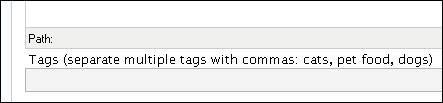
I’ve been waiting for tags to come out for a while. Now that WordPress 2.3 (Dexter) is here, I’m trying to integrate them into my site to the fullest extent. The following image shows the new Tag field that appears below posts.
Tags vs. Categories
First, to get the concept of tags right, think of tags as index words, and categories more like chapter headings. Lorelle explains,
Tags are like your blog’s index. They are keywords that represent the micro-categorization of your blog’s content. To work effectively, they need to be words that people search for, called search terms.
For each post you type, index the keywords into the tag field. For an example, see the tags at the bottom of this post in contrast with the post’s category.
Tags Are Not Automatic
I thought that after upgrading to WordPress 2.3 and adding some tags in the Tag field, they would automatically appear in my post. Actually, tags only appear after you add the tag call (php the_tags) to your singlepost.php page in your theme editor.
Note: If your theme uses the old loop, tags won’t work at all. So if you add the tag template tag to your singlepost.php page and you still don’t see tags, check out your loop. See this post from echo about resolving this problem.
Actually many themes and plugins themselves aren’t compatible with 2.3. If you encounter a database error, you can either start tweaking your theme by examining the code with the latest Kubrick 2.3 version theme, or just look for themes already compatible with 2.3.
Since I’d already been looking for a new theme, I used this upgrade as an excuse to implement the Limau Orange theme. (Do you like it, by the way?)
Structure Your Tags
Once you start applying tags, you’ll soon want to bring more structure and order to the tagging experience. You don’t want to repeat the same tags with synonyms or altered word spellings. You want to know what tags you’ve previously applied so your tagging is consistent.
The Structured Tag Library plugin brings this functionality to WordPress. It shows you all the previous tags you’ve applied and allows you to apply them to your current post. The following image shows the Advanced Tag Entry functionality this plugin adds.
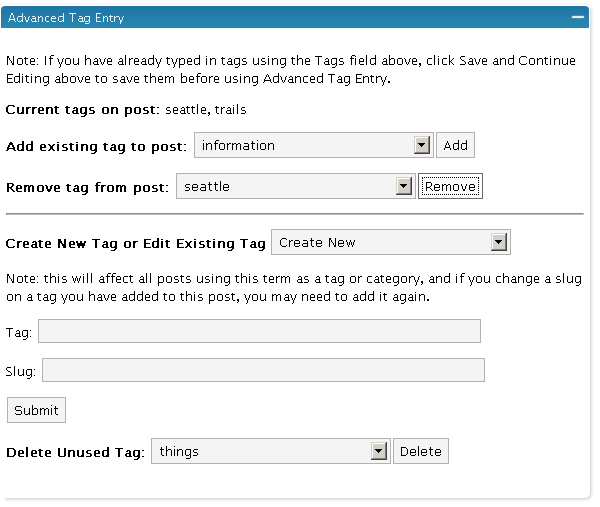
As you can see, you can select existing tags from a drop-down list. You can also remove tags from your list.
The Tag field represents how the tag is displayed, whereas the Slug field is how WordPress stores the tag’s name. Tag names can’t have spaces in them, so while a tag may be named “WordPress plugins,” the slug will read “wordpress-plugins.”
You can manage tags conveniently through the Tag Managing Thing plugin.
Related Posts Based on Tags
Through the Related Posts plugin, you can display related posts based on common tags (thanks Lorelle for pointing out this plugin and the previous). However, if you have 300 plus posts already written, going back through them to add tags can be a gargantuan task. I’m planning to pace myself and do a little each day. Until all posts are tagged, I’ll just leave in my WASABI Related Entries plugin.
A Tag Index
I’m not fond of the tag cloud. It looks scattered and cluttered (although intriguing in shape). However, I do value the index-style of words at the back of every book. You can reformat the tag cloud into a straight list and put it on its own page. The Codex explains how to do this.
Creating the tag cloud archive (which you can see on my Tag Index page) requires you create a page template with the wp-tag-cloud call on it. You can then style it by adding the .wp-tag-cloud li class to your stylesheet. The way I’ve implemented it, I consider it a keyword index for my site. More frequent tags appear larger in size.
I’m not sure if anyone looks at a tag index the way they look at a book’s index, but perhaps they will. Overall, I’m hoping tags will provide a way of making my buried content findable. Ninety percent of readers look only at the latest posts on the first page, even if you’ve written a thousand previous ones. If tags can integrate
Tags: findability, index, plugins, Related Posts plugin, Structured Tag Library plugin, tag cloud, Tag Managing Thing plugin, tags, usability, WordPress
Twitter
Facebook


Nice theme. My only complaint might be that the heirarchy with your subheds isn’t as clear as in your prior theme.
Regarding tags: Is it really beneficial to show them on your posts? Is you use the All in One SEO Pack, as I do, does this new WordPress tag feature offer any further benefits?
[...] – Implementing WordPress 2.3’s New Tagging Feature “First, to get the concept of tags right, think of tags as index words, and categories more [...]
Tags and SEO keywords are totally different. Tags are microcategories. When you click a tag, it shows you all other posts with the same tag. SEO keywords remain invisible to the reader. The keywords mostly just inform Google about the topic of the post.
I am not sure if Google factors in the tags as keywords as well — that is something I’d like to know.
Thanks for your feedback about the subheadings. I’ll work on that.
One thing I’ve not been able to ascertain (I’ve yet to upgrade my site) is whether or not you can use a combination of both category (as a large block filter) and then tags (to micro filter the category content).
THAT would be very useful.
If not, then you risk missing a post because the tag isn’t quite what you think it will be, no?
And does this mean I need to go through all my posts are tag them? That’s fine for onemanwrites.co.uk, but onemanblogs.co.uk has been going for years… I’ve still to properly go through and categorise the archives!
You can apply both a category and tag to a post. For example, this post is in the Blogging category, but it has a myriad of tags, such as Wordpress, tags, etc. Tags are like microcategories.
Yes, the process of tagging tons of back content looks incredibly painstaking. I’ve only tagged about 12 of 285 posts. the process doesn’t look very fun either.
I’m almost always a release behind. This time, it’s because none of my themes and several of my plugins are not 2.3 compliant yet.
I keep thinking that someday I’m going to have more time to get my themes updated. I’m kidding myself, I think.
It looks like tags are placed in the “meta name keywords” variable in HTML which is largely ignored by search engines these days since they were abused so heavily in recent years. Tagging should have little or no bearing on search engine results.
Aside – I think there’s something wrong with your RSS feeds. I can’t seem to subscribe to your native or Feedburner feeds anymore. You might want to try subscribing to your own blog to see if you have more luck than I do, but your feeds stopped working a little while ago so I’m forced to visit your front page to check for updates.
Brian, thanks for alerting me to feed trouble, but I can’t seem to reproduce the problem. My feed is http://feeds.feedburner.com/tomjohnson. Can you try removing the old feed and adding it again?
I did just replace the autodiscovery feed tag with my feedburner URL, so maybe that will help auto discovery. What RSS reader are you using, by the way?
Paul, I like your blog’s theme. The slit-photos (what’s the real term?) are really artistic. Just curious, how many other tech writing bloggers are there in Utah? Just you and me, or what?
Also, do you participate in the STC?
It seems to be working for me at home. Maybe there’s a problem with my Firefox installation at work.
[...] tag feature, others are embracing it and finding interesting ways of making it work for them. In Implementing WordPress 2.3’s New Tagging Feature, Tom Johnson explains how he is using the new tag feature in combination with the new Advanced Tag [...]
[...] Implementing WordPress 2.3’s New Tagging Feature from I’d Rather Be Writing [...]
[...] Implementing WordPress 2.3’s New Tagging Feature from I’d Rather Be Writing [...]
[...] tag feature, others are embracing it and finding interesting ways of making it work for them. In Implementing WordPress 2.3’s New Tagging Feature, Tom Johnson explains some of the WordPress Plugins he is using and [...]
[...] I’d Rather Be Writing – Implementing WordPress 2.3’s New Tagging Feature [...]
Seems to me tags are a significantly different from categories. Categories are a fairly static set of high level things that can be used to categorize your posts. Tags are a larger, more frequently changing set of keywords that are related to the specific content of your post. Thus, this post is in the Blogging category, but is tagged with wordpress, tags, blogging, and technorati. I’d like to have the freedom to tag my posts as needed without having to have hundreds of categories.
The tags normally show up only in your atom feed (add “atom” to the end of the URL you provided) since that’s where Technorati tries to pick them up.
[...] Implementing WordPress 2.3’s New Tagging Feature | I’d Rather Be Writing Says: 2007-10-08 02:52:02 [...]
Hey, Tom. I found that I needed to redo my theme when I upgraded to 2.5, and in the process revisited this entry to try to recall what to do about tags, which I’d previously been ignoring, and how they related to the All-in-One SEO Pack. Just want you to know your tech writing skills show, as you answered more succinctly and clearly the questions I had. Thanks.
Janets last blog post..Up and running. . . or at least walking
I must say I was a bit reluctant to use tags before but I’m glad I do now. They are relevant, better than categories and easy to manage.
Zhus last blog post..Things That Freak Me Out
What is the latest opinions of using tags for google? Any truth that they downgrade pages that do so?
What about tag pages? I’m finding that alot of my traffic is coming from tag pages. I didn’t see any settings for true/false with regard to tag pages. Thx.
Plastik cerrahs last blog post..Yüz Plastik Cerrahisinin Kapsadığı Konular
thank you very much
