


New WordPress Plugin Enables One-Click Installation of Plugins and Themes
The OneClick installer plugin from Anirudh Sanjeev won the recent WordPress plugin competition. It may seem hard to believe, but after you install the plugin and its associated Firefox extension, installing a plugin only requires you to right-click the plugin's download link and select OneClick Install > Plugin. Then voila, OneClick automatically installs the plugin and only needs activation from your plugin page. It works similarly for installing themes.

This plugin will save you time and allow you to more quickly explore the myriad of plugins published daily for WordPres.
I thought the installation instructions were a little scattered, so I wrote out a simplfied version below. To install and use the plugin, do the following:
A. Install the OneClick Installer
To install the one-click installer:
1. Click this link to download the OneClick plugin from Aniruah's page.
2. Unzip the plugin and upload it to your wp-content/plugins directory (just like any other plugin).
3. Activate the plugin.
For more info, see the OneClick plugin home page.
B. Install the OneClick Firefox Extension
To install the OneClick Firefox extension:
1. Go to the OneClick Firefox extension page and click the green Install Now button. After installing the extension, restart Firefox.
2. Go to the Dashboard page of your blog's admin console, and then click the new OneClick Install subtab that appears.
3. Copy the URL that appears in your browser's address bar (which corresponds to this OneClick Install subtab page).
4. In Firefox, go to Tools > Add-ons, and then click the Options button under the OneClick Installer extension. (See the following image.)
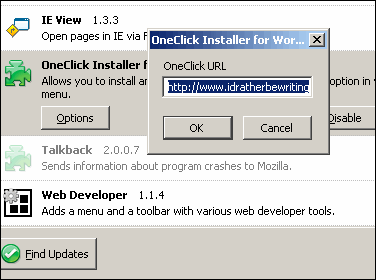
5. Paste the URL into the OneClick Installer field dialog box, and then click OK.
For more info, see the OneClick Firefox extension page.
C. Install a Sample Plugin
To install a sample plugin (and test the OneClick installer):
1. Go to the WordPress plugin page.
2. Right-click the Download link next to a plugin, and select OneClick Install > Plugin. (See the following image.)
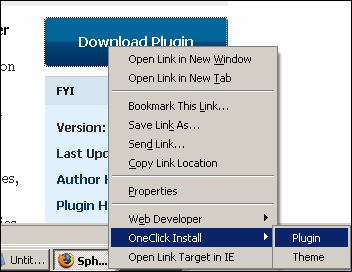
3. Go to your blog's Plugin page and activate the plugin you just installed.
Note: Many plugins may have additional installation instructions. For example, a plugin may require you to insert code into a page or do other tricks before it works. So while the OneClick Installer activates the plugin, be sure to see the specific plugin instructions for additional steps.
If the plugin doesn't work, make sure your plugin directory has 755 chmod attributes (just right-click the plugin folder in your FTP program, select File Attributes, and type 755).
You can also install plugins by going to the OneClick subtab from the your Dashboard, and pasting in the plugin zip file's URL into the Install from Remote Zip field.
Thanks Anirudh for writing such an awesome plugin. Also, thanks to the WordPress podcast for letting me know about it.
About Tom Johnson

I'm an API technical writer based in the Seattle area. On this blog, I write about topics related to technical writing and communication — such as software documentation, API documentation, AI, information architecture, content strategy, writing processes, plain language, tech comm careers, and more. Check out my API documentation course if you're looking for more info about documenting APIs. Or see my posts on AI and AI course section for more on the latest in AI and tech comm.
If you're a technical writer and want to keep on top of the latest trends in the tech comm, be sure to subscribe to email updates below. You can also learn more about me or contact me. Finally, note that the opinions I express on my blog are my own points of view, not that of my employer.