Home About Contact Podcasts WordPress Training

A Quick Way to Unsubscribe from Feeds in Google Reader

September 16th, 2007 | Posted in Blogging |

You can unsubscribe from feeds in Google Reader via the Feed Management page (see image below), but it’s not the most efficient way of managing the feeds.Subscription Management page — tedious to use
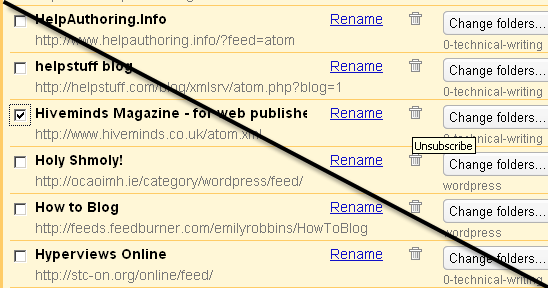
Using this method to unsubscribe can be tedious and time-consuming, because you have to leave the page you’re on and then scroll down to find the feed you want to unsubscribe from.

Instead, to unsubscribe from feeds in Google Reader:

1. Assuming you’re reading feeds from the All Items view, where all feeds are aggregated and sorted only by date, click the post title to expand the view.
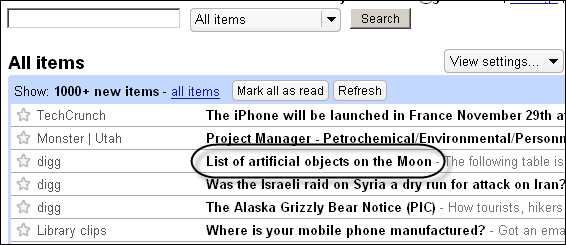
click the post

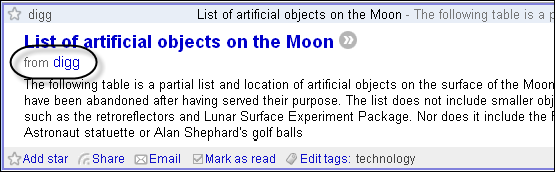
2. Click the name of the feed as it appears next to the word “from.”

click the name of the feed

3. Click the Feed settings button and select Unsubscribe.
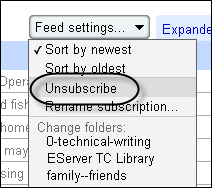
select unsubscribe from the Feed Settings button

Thanks Reed for the tip.

Like this post? Subscribe to the RSS feed RSS Feed.


Related Posts

Tags: , ,


AddThis Social Bookmark Button

Comments

You can leave a response, or trackback from your own site.

9 Responses to “A Quick Way to Unsubscribe from Feeds in Google Reader”

  1. I wouldn’t say that it is necessarily difficult for anyone with an elementary school education to unsubscribe to a feed. Sure, it might have an extra click or two involved, but it’s not hard.

    And, you don’t have to select the checkbox to unsubscribe. Just click on the trash can icon.

    If that’s really the reason you switched back, I don’t think you’re giving Reader a fair shot.

  2. I agree that it’s not intellectually difficult, but from a usability perspective, it takes about 20 seconds instead of 2. Plus you have to navigate to a separate screen and then come back.

    I think Google Reader would be much better if it allowed you to right-click and unsubscribe directly from the reading interface.

    I think usable feed management is a huge consideration in feedreaders. That’s why I think even though Google Reader has a lot of cool features, it lacks one of the more important features.

  3. There’s a ‘feed settings’ button when you view a post. Click on it to bring up a drop down menu with the ‘unsubscribe’ option

  4. I do it in five clicks in about 3 secs.
    From the ‘All Items’ reading window, click the name of the blog next to the word From.
    This will take you to the blog’s page in google Google Reader. From there click Feed Settings and choose Unsubscribe.
    Click the confirmation then click he All Items link on the left pane.

    Still difficult, bu not nearly as unbearable as the Manage Subscriptions page!

    Cheers.

  5. Actually, you can unsubscribe from the feed on the same screen you read posts. On the upper right side, next to the Expanded View and List View tabs, is a button labeled Feed Settings. In the dropdown, Unsubscribe is the third option. You don’t have to switch to a different screen at all.

  6. I read in the all feeds view set to sort by auto. This way you can page through all your feeds in one screen by repeatedly pressing the space bar. Much faster and less maneuvering than going feed by feed, but requires the extra clicks to unsub.

  7. Wow, I didn’t realize the shortcuts you guys mentioned. I thought the only way to unsubscribe was through the Manage Subscriptions page. Now that I see how to unsubscribe more easily, I think I’ll have to revise or retract this post. Thanks for the pointers.

    Tom

  8. You guys restored my faith in Google Reader so I rewrote the post with explanations of how to unsubscribe more quickly. Thanks again.

  9. [...] Google Reader’s fatal flaw: difficulty in unsubscribing from feeds [...]

Leave a Reply