


Vista Help Emphasizes Concepts in Effort to Create Power Users
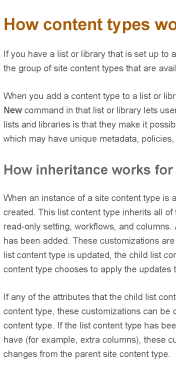 In this podcast from the Atlanta chapter, Rob Houser talks about Vista help, noting that topics in the help aren't just steps. They often have meaty conceptual explanations before the steps. This is a trend away from the heavily task-based help that has been standard in years past. For an example, look at this sample sample help topic from SharePoint 2007's help (excerpt on right). Look at all that conceptual stuff before you even get to the numbered steps.
Rob also says Microsoft's help now uses more screenshots, but the screenshots are more instructional. They often illustrate concepts and are more purposeful, rather than just showing the interface.
My Reactions
I like these two points. Some users need the basic, task-only topics. But power users need more information. And we often skimp on the conceptual, business-oriented information that users want because it's harder to write.
Why is it so hard to write? Oftentimes companies roll out software without knowing exactly how it will be used. So while the business, real-world information is essential, Rob says it often isn't discovered until the product has been used for 6 months or more.
The latest article in June's Intercom ("Kicking and Screaming: Modernizing Today's Help Systems") talks about providing user forums and other Web 2.0 mediums to supplement traditional help. This allows users to fill in the gaps for this business-process, real-world use information.
Lately I have been thinking that technical writing is more rewarding if you write the harder, more conceptual-based help. Describing simple tasks gets pretty dull. Sometimes I like the challenge of figuring out the impossible (or at least the hard to do stuff). Listening to Rob's talk reinforced to me the importance of conceptual information.
About Tom Johnson

I'm an API technical writer based in the Seattle area. On this blog, I write about topics related to technical writing and communication — such as software documentation, API documentation, AI, information architecture, content strategy, writing processes, plain language, tech comm careers, and more. Check out my API documentation course if you're looking for more info about documenting APIs. Or see my posts on AI and AI course section for more on the latest in AI and tech comm.
If you're a technical writer and want to keep on top of the latest trends in the tech comm, be sure to subscribe to email updates below. You can also learn more about me or contact me. Finally, note that the opinions I express on my blog are my own points of view, not that of my employer.