

Be Careful When Upgrading to WordPress 2.2 If You Have the WP-Cache Plugin — Adventures in Backing Up and Restoring WordPress Databases
May 22nd, 2007 | Posted in WordPress 36 Comments »
I spent a fun evening wrangling with WordPress 2.2. I attribute most of the trouble to the wp-cache plugin, because I kept receiving this exciting error:
Warning: fopen(/home/idrathe1/public_html/wp-content/cache/wp_cache_mutex.lock) [function.fopen]: failed to open stream: No such file or directory in /home/idrathe1/public_html/wp-content/plugins/wp-cache/wp-cache-phase2.php on line 96
I’ve never had a problem with a mutex.lock!
After several more attempts to upload the 2.2 files, I decided future endeavors would be useless, so I restored back to my 2.1.2 version. Oh boy, here’s where the fun starts.
I am very grateful for Podz’s tutorials at http://www.tamba2.org.uk/wordpress/. They are mostly superb. I was nervous when I had to delete all my WordPress files and my entire database, leaving me hanging only with an exported .sql file of 3.5 megs. That’s quite an interesting jumble of text to look at, by the way.
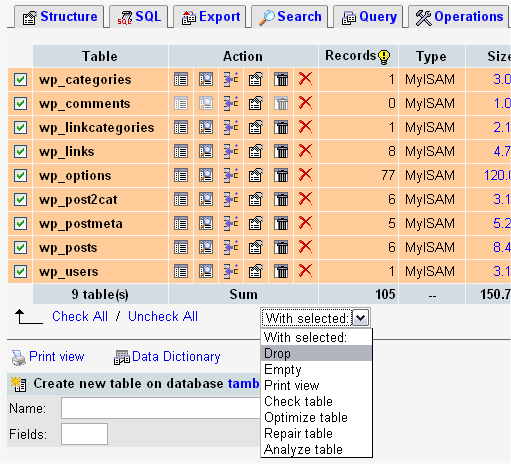
Here’s what you see as you are dropping [deleting] all your database tables (image from Podz’s tutorial):
Take a deep breath before you click Go. Well, of course I backed up my entire site in two different ways before deleting everything, but still, it’s no fun to annihilate database tables.
However, there’s an error in Podz’s restore instructions. Instead of using the Import function, he says,
Open the .sql file in a text editor. Do NOT use a word-processor, or Dreamweaver or GoLive unless you REALLY know what you are doing – on a Windows machine WordPad is okay. … You highlight some text, copy it, paste it into the SQL window, click Go and after the Success message, you do it again with the next chunk of text..
After I opened the .sql file in WordPad and copied it into the SQL window, I had some strange characters that appeared in my posts, namely these: ’ Â�. It’s an encoding issue that happened in the restore, since the Podz tutorials said it was okay to paste content from WordPad into a SQL text box.
I went to bed thinking I’d have to fix each post individually — this would have taken hours.
In the morning I woke up and checked the support forum, where I had asked for help with the strange characters. Lelion wrote:
This is a problem with incorrect encoding… WordPad is not the best choice when restoring databases
![]()
Better use Dreamweaver, which supports various encodings, and copy -> paste from it. Or any other editor, which supports UTF-8, and many other encodings… I can’t say if there’s a way to automatically fix the wrong characters in the database.. If you keep the original MySQL backups/files, better open them with the correct editor and make the copy paste again:)
I started to wonder why I didn’t just open the .sql file in Notepad ++. Or maybe Podz’s method wasn’t as easy as the Codex tutorial, which listed the following steps:
- Login to phpMyAdmin.
- Click databases, and select the database that you will be importing your data into.
- You will then see either a list of tables already inside that database or a screen that says no tables exist. This depends on your setup.
- Across the top of the screen will be a row of tabs. Click the Import tab.
- On the next screen will be a Location of Text Filet box, and next to that a button named Browse.
- Click Browse. Locate the backup file stored on your computer.
- Make sure the SQL radio button is checked.
- Click the Go button.
Sure enough, the Codex restore method worked, and it didn’t have the strange characters. It’s amazing what a night’s sleep does for troubleshooting.
Reflections on the Shortcomings of Open Source Models
This experience made me reflect on some serious shortcomings of WordPress for novice users. I consider myself a power WordPress user, but when it comes to dropping database tables, selecting the right check boxes in phpMyAdmin, and trying to understand problems that start with wp_cache_mutex.lock, I think WordPress becomes too esoteric. People don’t want to wade in code, especially when so much is at stake.
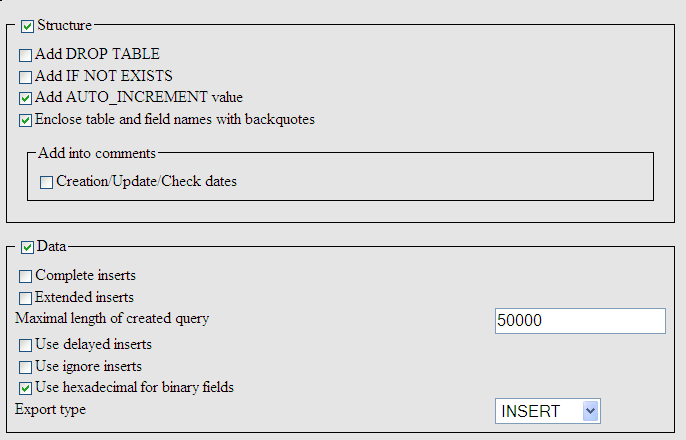
For example, when backing up your database, you have to select from among the check boxes in the image below. If you’ve not worked with databases before, these choices look foreign.
WordPress developers have to make upgrading painless. However, this raises an issue with open source software. The developer behind the wp-cache plugin ran out of steam and stopped development on the plugin a few months ago. As WordPress continues to develop, it requires changes in the wp-cache plugin and dozens of other plugins like it. Each plugin and theme must keep pace with the ever evolving, rapidly changing WordPress core.
That’s partly why it’s such a hassle to upgrade WordPress, because you never know what plugin or theme the new version is going to break. One solution is to minimize plugins and stick with mainstream themes. But if you take away plugins and theme variety, you might as well use one of the second-rate, boring blogging platforms.
Another Revelation: Comment Spam Continues Even When Your Site’s Broken
Here’s another interesting revelation I had during the two hours my site was down: comment spam kept arriving every 10 minutes even though there was no possible way to even see any posts on my site. I assume comment spam bots work at the file level, slamming the comment.php file with requests.
More Lessons Learned
Although deleting and restoring a database and all my WordPress files isn’t fun, I now feel more confident about the whole backup and restore process. If you don’t have Skippy’s back-up plugin already integrated into your site (it is now included by default with installations), be sure you have it. Go to Manage > Backup and make regular back-ups. You can also set up a …
Wait, in searching for the wp-cron plugin, which will automatically run a regularly scheduled backup, I found this note from Skippy:
I have officially discontinued support for all of my WordPress plugins. Over the past couple of months I’ve continued to receive questions about the plugins, so I thought I’d write here, once and for all, the authoritative explanation. All old links to the plugins should direct to this post, so now most folks should be made aware of what’s going on.
I’m focusing on Habari for now. My more popular plugins have found new homes, to which I have linked below.
Even Skippy has fled the scene. This means that when WordPress 2.3 or something comes along, someone else must ensure that all his plugins continue to be compatible with future WordPress upgrades. Skippy’s plugins include:
- cat2email
- sdm_comment_auth
- gravatars (new home: http://zenpax.com/)
- impostercide
- in-series
- not-to-me
- sdm_moderate_authors
- sdm_spam_check
- subscribe2 (new home: http://subscribe2.wordpress.com/)
- vhost
- wp-cron (obsolete in WordPress 2.1+)
- wp-db-backup
I’m guessing that many people have these plugins integrated into their sites already. When something goes awry in a future upgrade, maybe they’ll find this post.
Featured Information
If some one is thinking seriously about becoming an ebay affiliate then it should prefer professional hosting plans. Though companies are providing Linux hosting as well as the most secure UNIX hosting packages yet one should consider which is reliable and includes free web domain name. Leading ISPs not only provide wireless internet access but also offer hosting services to deliver versatility in their packages. Along online businesses the internet is promoting the trend of online training and people are leaning towards online mcse training rather than going to campuses.
Related Posts
- WordPress 2.2 — Here’s Why It’s Worth the Upgrade
- My WordPress Quick Start Guide — Now Available on the WordPress Codex
- WordPress for Beginners Course — Wednesday Evening, April 30
- WordPress as a Dr. Jekyll and Mr. Hyde Application
- Basic Tutorial
Twitter
iTunes


admin tab enhancements. It’s great that Comments now has its own tab. It’s great to be able to deactivate all plugins at once. Did I mention it’s faster? I’m quite happy with the upgrade. I have a couple ofsmall hiccupsand found a plugin that I couldn’t get to work. Luckily it was a minor plugin. Otherwise, no problems with the upgrade. And I know that with all computer upgrades there could be some hiccups. So, please, i
un-plugin installation). But remember to do this again if you change templates. Or upgrade WordPress. Or upgrade MySQL. Or upgrade PHP. Or inhale. Or exhale. When searching for a solution to the Popular Posts problem, I found a WordPress user (with aproblem with WordPress 2.2, database backups, and the WP-Cache plugin) who made these comments on the open source model: “WordPress developers have to make upgrading painless. However, this raises an issue with open source software. The developer behind the wp-cache plugin ran out of steam and stopped development on
[...] Member Thanks lelion. I blogged about my adventures with this issue here. Wordpress 2.2 backup and restore adventure Posted 7 minutes ago [...]
Nice explanation!
(me being ‘lelion’, I’d like to add a two words here)
Comment spam you see do not use your comment.php file. What you see is Trackback SPAM, I was puzzled by this, too, some time ago:)
The plugin you recommend – Skippy’s wp-database-backup plugin, I’d recommend it, too. On WP 2.2 it works OK, and it was included by default in WP 2.05 (pity it’s not included anymore…)
And… international characters, that often is a problem when making backups or restoring a MySQL backup… Wordpad is not the best choice (as we see)
Cheers, and good luck!
[...] 2.2? A Cautionary Tale May 22nd, 2007 by Sheryl Sisk Tom Johnson makes BNW two days in a row with this cautionary tale about upgrading the Wordpress files you depend on for your bloggy [...]
Did you try the built-in backup feature that is in Wordpress 201 and later? I have used that several times, and I think it works pretty well. In fact, I am going to have to fix a Wordpress install pretty soon (too much crap in the database), and I think I’ll be using that.
[...] 2.2 is definitely worth the upgrade. After my backup and restore issues the other night, I had a problem-free upgrade this time. The wp-cache plugin was what threw a [...]
Hi Chris, yes I use the built-in database backup feature regularly. I think it’s a great addition. One small note, though. Most people probably don’t know what to do with a zipped .sql file. I didn’t realize how easy it is to restore a database with that file until I actually had to do it. I still need to implement a cron job to run in it automatically.
Tom,
I was actually referring to the export feature, where you can export your posts and comments and such to an xml file (I believe). Would that not have worked for you in this instance?
Welcome to my world.
Yes, Notepad++ or PSPad will work better than WordPad. Don’t know why that was in the instructions.
WordPress Database Backup Plugin is now with Ilfilosofo.
Wasabi’s Related Entries Plugin is also no longer supported. I recommend you try one of the many other options in Blog Navigation WordPress Plugins: Related, Recent, Most Popular Posts and More.
And yes, spam never stops working. Which is why Akismet and Spam Karma both allow you to “recheck” your comment list for spam, which cleans out a lot of them.
By the way, if you use Bad Behavior with Akismet and/or Spam Karma, you do not need to use the useless math question. It doesn’t work anyway, no matter what comment spam protection you use.
Glad you figured this out. Quite the learning curve!
[...] Be Careful When Upgrading to WordPress 2.2 If You Have the WP-Cache Plugin — Adventures in Backing… [...]
Chris,
I haven’t experimented much with the XML export feature. That’s something I want to look into more. Thanks for suggesting it.
Lorelle, you are one of the most amazing bloggers I know. I will try the Akismet with Spam Karma and Bad Behavior plugins. Thanks for the tip.
I did read your post on the Related, Recent, and Most Popular Posts plugins — I actually stumbled across the post before you commented on my blog. That’s how I found the contextual posts plugin. (The author just fixed a bug it in that made it even better.)
Keep up the good work. I like the Blog Herald. Just curious — do you have any podcasts, such as a podcast where you’ve been interviewed on blogging?
And are you a heavy contributer to the WordPress Codex?
Ah, such a good tutorial. Thanks.
Allso, if stuck, read this guide
Cheers mate!
Congrats on holding down the fort! I had a brush with catastrophe while upgrading to 2.0, but the loose interdependency between WordPress and MySQL saved my butt since I seemed to somehow clobber one but retain the other. It was interesting delving into the guts of WordPress for the first time, but it was rather nerve-wracking since so much prior hard work was hanging in the balance. Necessity is the mother of comprehension, I suppose. Shame that subsequent versions of WordPress are often quite different from previous ones, so lessons learned are not practical for long (e.g., I have no idea how to change the default image thumbnail size anymore).
WordPress sorely needs a “Windows Update” kind of system to keep the system and plugins current, methinks. I was fortunate enough not to run into the WP-Cache error you discovered, but I suspect it’s because I’m using such an old version that it doesn’t work at all anymore. It’s a lot of bother keeping up-to-date with so many decentralized plugins. However, I’ve customised a couple of plugins so I’d want to suppress updates on those to retain my settings. Maybe WordPress is too complex to warrant an automatic updater after all.
It’s unfortunate that we still cannot recommend a self-hosted solution to the more technically-squeamish bloggers. Writing about your tribulations is surely the best way to get your feedback out there, though, so please keep on tinkering and sharing your experiences!
Brian, thanks for your comment. I agree that WordPress needs a feature like Windows Update. Upgrading is never fun. I suppose the incompatibility with the plugins is due to the open source nature of Wordpress.
It seems like I’m always talking with people who want to get into blogging. There are easy solutions, like Wordpress.com, that most anyone could figure out. But it’s not nearly as fun as the self-hosted solution.
[...] quite happy with the upgrade. I have a couple of small hiccups and found a plugin that I couldn’t get to work. Luckily it was a minor plugin. Otherwise, no [...]
Help! I have the same problem. I understand what you said to do but I have no idea when the last time I last backed up my database. What do I do?
The easiest way to back up your database is to install this backup plugin: http://ilfilosofo.com/blog/wp-db-backup.
Activate it, and then go to Manage > Backup and follow the on-screen instructions to create a backup. It will generate an .sql file. Download this to your computer or to your web host. If something goes wrong, just search the codex on restoring your database. The .sql file is all you need.
wordpress is a great web application !
Nice article Tom. It helped me solve the encoding issue I was having during a WP migration. Even the tech support at the host company didn’t know how to solve it.
Cheers!
Thanks Aaron. I’m glad to hear it was helpful. Encoding issues can be a big pain.
Well done, great blog and great posts!!!!
Interesting story – thanks for the advice.
I work with a number of Wordpress blogs and it is always good to see what others have to say about upgrading to the latest versions, etc. I tend to learn a lot from these bits of information.
Thanks again.
I’m getting this WITHOUT upgrading to 2.2 – anyone have ideas?
Warning: fopen(/home/wlfxymb/public_html/createvalue/wp-content/cache/wp_cache_mutex.lock) [function.fopen]: failed to open stream: Permission denied in /home/wlfxymb/public_html/createvalue/wp-content/plugins/wp-cache/wp-cache-phase2.php on line 96
I’ve upgraded one site with no problems to 2.2 but am still taking my time with another one. However, for those wanting ‘cron’ backups, I would really recommend Wp-DB Manager by Lesterchan/Gamerz. It allows you to backup manually but the main feature (imho) is taht it automates backups (including optimising databases) and you can even set it up to have the file (compressed or not) emailed to your email account. You can also adjust the frequency of backups (I’ve set mine to every 6 hours, since ‘daily’ just doesn’t seem to be enough for a paranoid user like myself ^^)
It’s actively supported at the moment, so I think it will be a good alternative to ‘Skippy’s’ plugin.
David,
If you haven’t solved your problem already, try this:
1. Back up your entire system first.
2. Disable all plugins, and physically delete the wp-cache plugin from your wp-content/plugins directory using an FTP program. (Don’t merely deactivate it.)
3. Download your wp-config file and open it up in Notepad or some equivalent text editor. Remove the line that the wp-cache plugin inserts in it:
define(’WP_CACHE’, true);
Then re-upload the wp-config file.
4. Upgrade to the latest version of WordPress.
5. Reactivate your plugins (not the wp-cache — you should have removed that one).
You should no longer receive the mutex lock error. At least this process worked for me. The wp-cache plugin is more thoroughly integrated in your blog than you may realize. Let me know if you have success.
Flick,
wow, backups every 6 hours! You are paranoid. Just kidding. Thanks for the recommendation. I agree that an automated backup schedule is ideal.
I have my backup plugin email me a backup once per week. I really wish I had the option to be sent a backup after each post, but I suppose this schedule accounts for when I make changes to the template as well.
As my dad taught me, “When’s the best time to back up?” “Five minutes ago!”
im have the same wp-cache in my WP setup, Tom’s suggestion worked but i think its better if you have wp-cache to work again.
I edited my robots.txt file in Notepad on my girlfriend’s PC when my Mac went out of commission and it borked things—that vexed me pretty well. I can only imagine the pangs of fear and anger screwing up a database with it would cause me.
You’d think UTF-8 would mean UTF-8.
Hello there.
Just found your site. Great job!
I like it much.
look here http://live.com
Hello
Wasjust serfing on net and found this site…want to say thanks. Great site and content!
[...] in the wp-config.php file. Tried this method, but it didn’t work. Then I read up the idea of converting the SQL in a text editor. It’s kinda manual, but it [...]
[...] Be Careful When Upgrading to WordPress 2 2 If You Have the WP Posted by root 2 hours 34 minutes ago (http://www.idratherbewriting.com) Quick reference guide gallery middot 20 usability tips for your blog brian thanks for your comment i agree that wordpress needs a feature like windows update you should no longer receive the mutex lock error 2008 i 39 d rather be writing powered by wordpr Discuss | Bury | News | Be Careful When Upgrading to WordPress 2 2 If You Have the WP [...]