

WordPress Plugins: Take Your Blog's Functionality To a New Level
The process of discovering new plugins — and suddenly transforming your blog into something more — can be exciting (but also sometimes unclimactic).
Rationale Behind Plugins
 Some blogging platforms already come equipped with the same functionality as some of WordPress's plugins. You may think having to manually add plugins is a pain. Why not just include them all in the core product?
Yet this is the very genius of WordPress. The absence of plugins keeps the basic WordPress software simple. Users who need additional functionality can add it. WordPress doesn't burden you with tons of features and options you don't need. WordPress remains simple — yet extensible — through the plugin model.
Plugins Are Open Source Contributions
Ninety-five percent of WordPress plugins aren't made by the WordPress team (Automattic). They're made by PHP blogging enthusiasts across the globe. WordPress is open source, so programmers can contribute their own additional functionality. Plugins are popping up all the time (on average 3-4 new plugins a week).
The fact that plugins are open source also means some plugins are a little buggy. Not everyone is a PHP whiz, and WordPress changes pretty quickly, so at times plugins may not work. Glancing at the popularity of a plugin prior to installing it will give you an idea of its trustworthiness.
What Does PHP Mean?
Most plugins are PHP scripts that make calls to your database for specific content. PHP stands for Hypertext Preprocessor (you don't need to know that). PHP is an open-source server-side scripting language that interacts with your database. PHP allows you to provide dynamic web content that can be pretty cool (samples coming in a minute).
PHP tags exist alongside HTML tags in the theme files you edit, but when your pages are published, you won't see the PHP in the code because it's server-side rather than client-side.
To see a variety of definitions of PHP, google it like this: define:php. Here's the best part: You don't have to know any PHP to use plugins. (But if you do, you'll be better off in the long run.)
A Centralized Plugin Directory
Recently WordPress announced a centralized plugin directory. This central location provides popularity stats and download statistics for plugins — two easy ways to browse the directory. You can look at the latest plugins and see if any look useful.
You can also find plugins by googling "wordpress plugins" and perusing the search results. A lot of bloggers make lists of their favorite plugins. You can see the plugins on my site here: https://idratherbewriting.com/plugins. The ability to automatically display my plugins from my plugins folder is itself a plugin. I also included images with most of the plugins so you can see just what the plugin does.
Sponsored
Installing Plugins
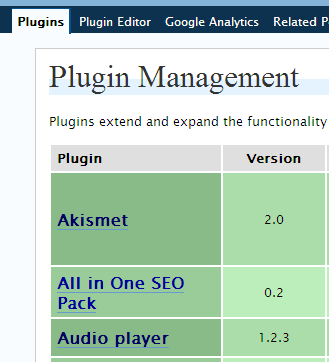
Installing plugins is similar to installing themes. You download the plugin, unzip it, and then upload the file into your wp-content/plugins directory. Then you navigate to your Plugins tab and activate the plugin. Most plugins have further customization options on the Options tab. If you're PHP savvy, you can also edit the plugin's code by clicking the Plugin Editor subtab.
For a screen demo of how to install a plugin, see this video prepared by Andre Chaperon, who explains how to install the google site maps generator plugin.
Each plugin has its own instructions, so be sure to check the author's site or plugin page and follow them.
Installing Plugins: What Authors Assume You Know
Most plugins are written by hobby programming enthusiasts. They're not technical writers, and often assume the user knows more than he or she does. Here are three things author sometimes forget to mention:
1. You must add PHP tags around tags. Some plugins come with a bit of code you have to insert in a specific file. If an author says the plugin is called using related_posts() -- actually that tag won't call the plugin. You have to surround that tag with php tags, like this:

The exception is if the tag already appears between other php tags.
Why do some authors omit the php tags? If the authors added these surrounding php tags in their explanations, the code would corrupt their page's display, so some authors assume you realize the code must be surrounded by php tags. In contrast, some authors have code formatting plugins that enables them to show code.
2. PHP code won't run in posts or pages. PHP code will only run in your theme's core files (such as sidebar.php, page.php, or index.php). You can edit these files by going to Presentations > Theme Editor location and adding the script, or by downloading the files and working with them in Notepad or Notepad++. If you just drop PHP tags in a post or page, it won't work.
However, you can create a new page template (from page.php), drop in the PHP code, and then create a new page based on the template with the new PHP code. When you do that, it gives the effect of a page running PHP calls. It's easier than it sounds. For more info, see Pages in the Codex.
3. PHP exec. widget is required to run PHP in widgets. Another assumption is that you can just include php tags in your widgetized sidebar. If you want to install plugin code in a widget, you need an Exec-PHP widget to enable PHP scripts to run in the widget. (If you are manually editing your sidebar.php file, you can just insert PHP in there without any additional plugins.)
Editing PHP
Sometimes you must edit a PHP file. If editing in the Presentation > Theme editor isn't adequate, you can edit PHP files in Notepad, or you can use a more advanced text editor, such as Notepad++ (the Codex recommends at least a dozen different ones). Notepad++ provides line numbers for the PHP files. This is sometimes helpful when you're editing the plugin.
A Lot of Plugins Don't Work
You may find that plugins are often hit and miss. Some work awesomely. And some don't seem to work at all, or the plugin is so vaguely described that it isn't clear just what the plugin does (or how it's implemented).
Some plugins aren't compatible with the latest version of WordPress, so make sure the plugin is compatible before you install. Then test the plugin after it's installed. Other plugins may seem to work, but then prove buggy.
For example, I installed the MiniPost2 plugin to create asides (little announcements in the sidebar). I was excited about how easy the plugin was to use. Then today I searched for something with my site's search engine, and I noticed my posts were duplicated 2-3 times each in the search results. Huh? To troubleshoot, I started disabling the plugins one by one. When I deactivated MiniPost2, the problem disappeared.
If you want to remove a plugin, remove any code you manually inserted, and then deactivate it from your plugin page. Then use FTP to delete it from your wp-content/plugins directory.
Note: If you leave php calls inside theme files after removing or deactivating the plugin, you'll see an error message.
Implementation Is Often Unique
Before implementing any plugin, be sure to read the author's instructions carefully. If you need help (like if it says to CHMOD a file and you have no idea what that means), visit http://wordpress.org/support and ask for help.
Update: Recently a plugin was released -- called One-Click Install -- that allows one-click installation of plugins from a Firefox browser. Read my post on it here.
Plugins Useful for CMS Functions
Here are a few plugins you may want to use when building a CMS type blo.g
- List Subpages plugin: Lists the child pages of a parent page.
- Subpage Listing: Lists the child pages in the page navigation structure (haven't tried it).
- WordPress Navigation Tool: Helps you organize your navigation structure for CMS-ish implementations (haven't tried it).
- e-Commerce Lite Shopping cart: a shopping cart
- PodPress: an audio player that syncs with iTunes (used to use it for Tech Writer Voices, but lately I experienced incompatibility).
- Shift This Newsletter plugin: a newsletter plugin (costs money -- haven't tried it)
- AJAX-Shoutbox, Pierre's Wordspew: a chat feature for your site. This was very useful for some Suncoast chats.
Additional Resources
To learn more about plugins, see the Codex entry on Plugins and Managing Plugins.
About Tom Johnson

I'm an API technical writer based in the Seattle area. On this blog, I write about topics related to technical writing and communication — such as software documentation, API documentation, AI, information architecture, content strategy, writing processes, plain language, tech comm careers, and more. Check out my API documentation course if you're looking for more info about documenting APIs. Or see my posts on AI and AI course section for more on the latest in AI and tech comm.
If you're a technical writer and want to keep on top of the latest trends in the tech comm, be sure to subscribe to email updates below. You can also learn more about me or contact me. Finally, note that the opinions I express on my blog are my own points of view, not that of my employer.