10 Ways to Make Your Blog More Appealing
February 12th, 2007 | Posted in Blogging 20 Comments »
I was reading a post by John Chow on 10 blogging mistakes that got me thinking about some basic usability principles when it comes to blogs. When reading blogs, here are 10 simple principles to follow. I’ve used some screenshots from John Chow’s blog that illustrate some of my points.
- Allow me to easily comment. If you disabled comments because of spam, it ruins the interactive appeal of your blog. Blogs are two-way conversations. But even if you require users to register and then sign in before commenting, I also find this a turn-off. First, I may not remember my username and password for your site. Second, signing it may require me to visit a different screen, which then makes it difficult to retrace my steps to the post where I want to comment. Basically, install Akismet or some other spam blocker and just deal with the occasional spam post. It’s worth it. If you moderate comments, please don’t delete my comments if they are unfavorable.
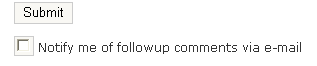
- Allow me to easily track responses to my comment. After I comment, I may be curious to see your response, but I cruise around a lot and may forget to return to your site. Use a plugin like Subscribe to Comments that sends me an email when you or someone else responds to my comment.
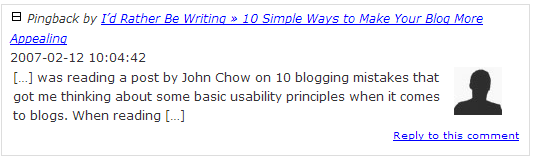
- Enable trackbacks in your comments in case I want to type a long post. Sometimes I may not want to post my 5 paragraph reply into your comments field. I may want to springboard off your post by typing a new post on my blog, but at the same time I want you to be aware that I commented on your post. If you have trackbacks enabled, my post will be excerpted in your comments section.
- Put an RSS feed button
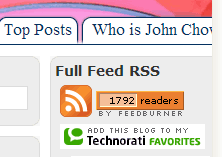
where I can easily find it. When I first visit your site, I look at the content of your posts to see whether you’re writing about a topic I’m interested in. If so, I would like to subscribe to your feed, because your blog URL may be tough to remember or because I prefer to read blogs in a newsreader. Use the traditional orange RSS button
and put it somewhere visible. Ideally, place it above the fold. “Above the fold” is a phrase from newspapers that refers to putting content on the first half of the newspaper’s front page. With screens, it means not having to scroll. You should also modify your code to make it autodiscoverable if someone just types a link in their newsreader.
- Identify the topic of your blog. When I find your site and am glancing at it, I’d like to know what topics you blog about, quickly. Is it a technical writing blog, a political blog, an educator’s blog? If you could summarize your blog’s theme somewhere either in a tagline or other prominent place, it will help me know whether I should subscribe. I also look at the posts on your home page — are they what I’m interested in reading about? If you blog about anything and everything, your blog may be too varied for me. I’ll have to wade through your posts on politics and religion just to find the occasional post on technical writing.
- Tell me a little bit about you. Ideally, your blog should have an About page that informs me about who you are. I’m reading your personal thoughts and opinions, so it’s nice to know who you are, such as where you’re located, whether you’re a technical writer or someone else, if you’re a student or seasoned consultant, etc. You don’t need a picture, but at least a name and brief description of yourself. Preferably avoid limiting the description the anonymous zany descriptions like “I am infinite and get upset at cricket sounds in the mornings, etc.”

- Write what you really think. One of the major appeals of a blog is to read your authentic voice. If you just write from an objective, reporter-like position, I will be turned off. I want you to reveal your real personal thoughts on the topics you are writing about. The real you should be apparent.
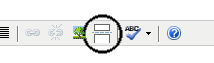
- If you do have a long post, use the more tag so I can scan down your list of latest posts on the front page. The more tag (see the following image) inserts a “Read more” link in the middle of your paragraphs. If you have a three page post that isn’t compressed with the read-more tag, then I may not scan to view any other posts on your blog.
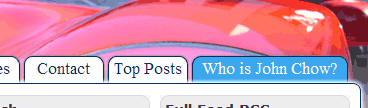
- Make it easy for me to contact you. News flash: sometimes I may actually want to contact you “off-blog” to ask you a question totally unrelated to the current posts on the screen. Your email should be easily accessible. It would also be nice to include your phone there, but certainly provide an e-mail. I may want to interview you for an article, podcast, or someone may want you to present at a conference.
- Write new posts regularly, preferably daily. How often do you want me to check your blog to see if you’ve written anything new? If you only post once a week, or if you go on random posting streaks followed by weeks of inactivity, the guessing game may be too much for me. Of course your new posts will bubble up to the top of my newsreader stream of posts, but sometimes I like to check my favorite blogs by going directly to their home pages.
Finally, I offer this last tidbit as optional. If you are widely read, add the Feedburner chiclet that lets me know how many readers are subscribed to your feed. If you have more than a 1,000 readers, you really must be worthwhile so I am more apt to subscribe immediately. If you have fewer than 10, you may still be interesting, just not that popular yet.
Featured Information
There are lots of web hosting companies who are providing several services and any one can cell domain or if any one have expired domain then he can renew domains very easily. Nowadays any one who has computer knowledge can start home business easily because internet marketing advertising companies available or one can write web hosting articles but before doing all internet related work one must have cisco certification to do all computer related matters if any one wants to get d link wireless internet connection then its very easy and gives best speed.
Twitter
Facebook


Pingback fromI’d Rather Be Writing » 10 Simple Ways to Make Your Blog More Appealing
These are useful tips, a kind of checklist if you will. Thanks. By the way, can you point me to more info about item 8? I want that effect, but I have not yet figured it out. There are still a million loose ends about just the technical side of blogging! A WordPress meetup group has started here in Denmark (http://wordpress.meetup.com/172/), which made me really happy – until I discovered their first meeting is on my birthday! I am grateful for Lorelle of http://lorelle.wordpress.com/ fame, but it will be nice to get together one day in one room with a group of enthusiastic bloggers and Wordpress users and get a real boost to my blogging career.
That’s so cool that you have a local Wordpress group. There are a lot of technical aspects about WordPress that seem to never end. I mean, you can just use a regular wordpress.com blog and never realize all that is possible with a blog. You’d have to know PHP to be able to do all you can, write plugins and do major overhauls, etc. One day I’d like to learn PHP, but so far I haven’t gotten around to it. The Wordpress codex and support forums have a tremendous amount of information.
I added a screenshot to #8 identifying the read more button. I also have a content show/hide plugin that makes this function javascript so that page doesn’t have to reload. I think I got the plugin here: but I can’t remember. But even without the plugin, the Read More feature is useful if you write long posts. Not so much if you write short posts.
Unfortunately, the Read More plugin transfers to feeds, so people will basically have to visit your site to read the full content. I haven’t figured out a way around that, but I would like to.
Thanks for the update, Tom. I’ll look into this.
I use Google Reader where I first read your posts. The Read More link is visible as a hyperlink, but I get the subsequent text, too, so I don’t have to visit your site to read the entire text.
There is also a section on the Write Post page called Optional Excerpt, which I first thought was a way to provide only a few lines to a feed subscriber. Filling that in had no effect on my feeds, so I am not sure where that is used. Another matter to track down.
I’m ahead of you on the PHP matter. I have a great little guide called “PHP og MySQL for absolutte begyndere” (PHP and MySQL for absolute beginners.) I read it all in one sitting – the entire topic is really easy if you have the slightest knowledge about a database. My advantage is – I know the author of the book from my webgrrls network! Sitepoint.com has loads of information about PHP as well.
I don’t use the excerpt field so I had to look this one up (by the way, to look something up, one of the easiest ways is to do a site-specific search with Google. I usually go to Google and type this, site:wordpress.org/support “optional excerpt” field.
It led me to this page (after clicking a link):
http://codex.wordpress.org/Template_Tags/the_excerpt
The page itself isn’t all that clear, but here’s what it’s saying.
When you click a category link in your blog, you’re shown an archives page that shows only excerpts (brief paragraphs) of that topic. The default excerpt is the first 55 words of your post. But what if you start your topics with a cute lead-in, or some other way? What if you just want a more straightforward summary of the post to appear in the archive or category view? The Optional Excerpt tag allows you to do that.
In your admin dashboard, go to Presentation > Theme Editor. Click the Archive link of your current theme. Look for where the phrase “php the_content” appears. This will be within the loop. In my theme, it appears like this:
< ?php the_content("Continue Reading »"); ?>
Replace this tag with the following:
< ?php the_excerpt(); ?>
Now test it. Go to one of your posts. In the Optional Excerpt field, type a summary or description of the post. Then visit that page via the category archives. You’ll see that instead of the first 55 words showing, you see the optional excerpt you typed.
Here’s an example. With the Ze Frank post, I typed an optional excerpt that is more of a summary of the post. But if you click the post title, you’ll see the full post, and the first 55 words of my post show, rather than the optional excerpt.
As a side note here, in the theme’s files (the Presentation > Theme Editor section), different PHP files load different aspects of your site. The Archives page is what applies when you’re viewing posts by category or by archive date. The Main Index page is what shows when you view posts from the home page. The Single page is what shows when you click a post’s title. All of them call “the loop.”
(If you don’t know what the loop is, be sure to look that one up on the codex. It is what calls posts from your database, and it’s one of the most important aspects of your blog.)
I think this Optional Excerpt field may be useful. I haven’t really used it much, but I might. Do you think that it would provide a better reading experience for someone who is perusing archives?
By the way, speaking of archives, a lot of bloggers provide archives by date. I can think of almost no one who browses a site’s archives by date. That is a legacy carryover from the “blogs are personal journals” concept. The best archives are by category, in my opinion. Of course one can provide both an archive by date and category archive, but I think the archive by date is pretty useless. It basically tells readers how long you’ve been blogging.
What do you think of this Optional Excerpt field?
[...] 10 Ways to Make Your Blog More Appealing, by Tom Johnson [...]
[...] 10 Ways to Make Your Blog More Appealing [...]
[...] 10 Ways to Make Your Blog More Appealing, by Tom Johnson [...]
[...] 10 Ways to Make Your Blog More Appealing | I’d Rather Be Writing – When making blogs, here are 10 simple principles to follow. [...]
[...] 10 Ways to Make Your Blog More Appealing, by Tom Johnson [...]
[...] 10 Ways to Make Your Blog More Appealing, by Tom Johnson [...]
[...] to type into a computer, Gord. Alan [6:49 PM November 17, 2007] And, gee, I was actually just applying rule #7
Post a Reply Name:Web Address:(optional)Email Address:(optional)Your email address will [...]
Tom,
I do not know how long you have been blogging, but it seems that you have a very popular blog. I recently started a blog and I really do not know what to expect. I want people to make comments on my blog and begin communicating, but I don’t know how to get them to go to my blog. Any suggestions aside from all your helpful tips? How did you attract people to your blog? To find you, I googled about tips to make your blog popular.
Looking forward to your advise…
I’ve been blogging for a couple of years. One question: are you writing just for comments? If so, you might get burned out quickly if you don’t receive many responses. But I imagine you’re writing for larger purposes. If so, keep the larger purpose in mind for the first 6 months.
Also, when you leave a comment, include your URL so that others can discover you. For example, had you left your URL in the comment form, I would have gone to your site and possibly subscribed if the posts looked interesting to me.
So if you want to increase readership, do the following:
1. Write a new post every day or so and make sure the content is good.
2. Pick a specific focus for your blog that will attract readers looking for information in that niche.
3. Add a lot of comments on other blogs, always including your blog URL.
4. Don’t be impatient for comments. They will come, in time.
5. Offer to write guest blog posts on popular blogs. For example, if you want to write a guest post for my blog, I might accept it (it depends on the topic and quality of the post).
Good luck.
Tom
Hi Tom,
Very interesting post I must say! Though I don’t like John Chow that much, I believe you have exposed some very nice tips for new bloggers (like me) here.
I think my site complies with most of what have been said here. However, I don’t have a “Contact me” page/form… I don’t feel ready for that
Keep going! You’ve got a nice blog!
Ikki’s last blog post..Hypens in domain names?
This is a Great Blog! Thanks for the Info…I’m hooked!
Website Traffic USA
http://www.websitetrafficusa.com
Website Traffic
Email Campaigns
Guaranteed Sign-Ups
Blog Team
Traffic = Sales
[...] 10 Ways to Make Your Blog More Appealing, by Tom Johnson [...]
[...] 10 Ways to Make Your Blog More Appealing, by Tom Johnson [...]
10 Ways to Make Your Blog More Appealing, by Tom Johnson [...]
[...] 10 Ways to Make Your Blog More Appealing, by Tom Johnson [...]