

Making a Chapter Member Map Mashup with Google Maps
For a long time now I've wanted to make a chapter member map mashup with Google maps. To see what I'm talking about, look at this page: http://stc-suncoast.org/map.html. I'm not finished putting all the members up there — this is obviously just a start.
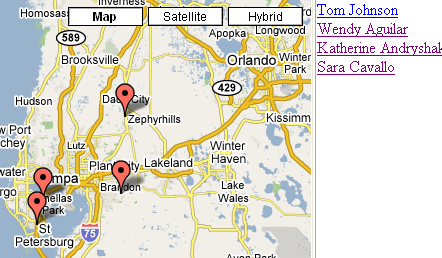
Google Maps has an API that allows you to blend your own data with their mapping system. It's really much easier to create a Google map mashup than it may initially appear.
To create a member mashup with Google maps:
- Go to the Google API page and sign up for an API key. This is a long string of digits you'll need.
- Go to this sample page, right-click to view the source code, and copy the source code. More map possibilities are here.
- Paste the source code into a notepad file, change the API key to your own API key (this appears near the top after the word "key"), and save the file with a .html extension.
- Look for the following text in your file:// Set up three markers with info windows
var point = new GLatLng(43.65654,-79.90138);
var marker = createMarker(point,'<div style="width:240px">Some stuff to display in the First Info Window. With a <a href="http://www.econym.demon.co.uk">Link</a> to my home page</div>')
map.addOverlay(marker); - Replace the coordinates inside GLatLng() with the coordinates of the markers that you want. To convert your addresses into coordinates, use single geocoder for small addresses or this batch geocoder for larger jobs.
- Replace the text "Some stuff to display in the First Info Window..." with text that you want to accompany your marker.
- Repeat that chunk of marker text for as many markers as you want to create.
- Upload the .html file somewhere on your directory. Voila, your Google mashup map appears.
Sponsored
About Tom Johnson

I'm an API technical writer based in the Seattle area. On this blog, I write about topics related to technical writing and communication — such as software documentation, API documentation, AI, information architecture, content strategy, writing processes, plain language, tech comm careers, and more. Check out my API documentation course if you're looking for more info about documenting APIs. Or see my posts on AI and AI course section for more on the latest in AI and tech comm.
If you're a technical writer and want to keep on top of the latest trends in the tech comm, be sure to subscribe to email updates below. You can also learn more about me or contact me. Finally, note that the opinions I express on my blog are my own points of view, not that of my employer.