


Dynamic Help in Visual Studio .NET
Dynamic help is help that automatically shows help for the page the user is on. The user does not need to click anything (if the help pane is showing) for the help associated with that page to appear. If you have Flare and turn on its dynamic help, you can see an example.
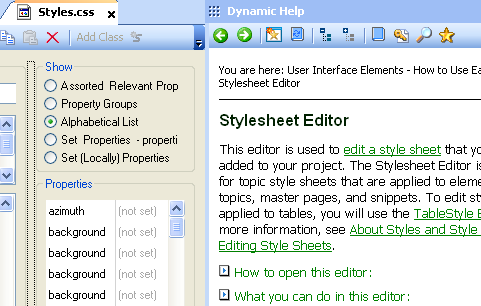
The following image automatically shows the help pane that corresponds to the Style editor.
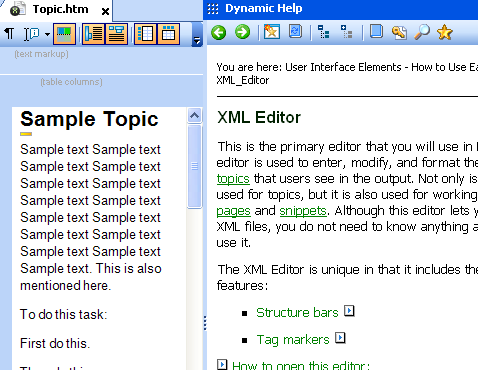
When you move to the Topic tab, where the XML editor is available, the dynamic help pane automatically shows the help for the XML editor.
On the one hand, automatically showing the help relevant to the page makes the help immediate and relevant. On the other hand, if you leave the help pane exposed, the constantly changing topics might be a little distracting. In that case, there's a push-pin that you click to auto-hide the pane.
If you've written dynamic help, I'd like to interview you on Tech Writer Voices (email me at [email protected]). I'm wondering how hard dynamic help is to implement, whether users find it useful or annoying, and the different ways you integrate it with your applications.
About Tom Johnson

I'm an API technical writer based in the Seattle area. On this blog, I write about topics related to technical writing and communication — such as software documentation, API documentation, AI, information architecture, content strategy, writing processes, plain language, tech comm careers, and more. Check out my API documentation course if you're looking for more info about documenting APIs. Or see my posts on AI and AI course section for more on the latest in AI and tech comm.
If you're a technical writer and want to keep on top of the latest trends in the tech comm, be sure to subscribe to email updates below. You can also learn more about me or contact me. Finally, note that the opinions I express on my blog are my own points of view, not that of my employer.