


WordPress Shopping Carts

I created a site for a friend who simply wanted some presence on the Internet to publish her essays. Easy enough. I decided to use WordPress as a CMS. I thought I could do it all in about an hour, but then of course I ran into a few snags.

Here are the two main technical snags:

  • Creating a static home page, and having the blog area available from another link.
  • Integrating the e-commerce lite shopping cart.

The solution to the static home page proved to be pretty simple. The best solution is available is the one on the Turbocharged site. However, the specifics of my situation made it tough. I created the site as an add-on domain in a folder directory on my host. Whenever I used the method described on Turbocharge, the .htaccess file kept being overwritten and it caused the site links not to work. This is because I had enabled permalinks. I thought the Turbocharge method was faulty, so I kept looking for alternatives.

The .htaccess file controls how the site reads the pages of the directory. The only solution I found was to disable permalinks. This means the URLs aren’t pretty, but I consider it the problem of the add-on domain situation. The guy at Blue Host (my host) said things can easily go haywire with add-on domains.

The second problem was with the e-commerce lite shopping cart plugin. It seems simple on the surface, but despite the instructions included on one of the tabs, it is not entirely intuitive. I have to remember this when I write instructions: always dumb-down the level lower than you think.

But figuring it out wasn’t too difficult after a while. The problem was that after I got everything working, I realized that the shopping cart dropped down when the user added products. The cart dropped right over the text of the products themselves! Frustrating. I added some text at the top to fix that. But then I discovered another problem: the cart only worked in Firefox, not IE.

I later realized that the page parameters within the e-commerce tab didn’t have the pages of the add-on domain’s URL, and that was why I was getting the empty cart error.

If I could have one WordPress wish, it would be for some brilliant PHP programmer to create a more robust, functional shopping cart for WordPress.

Despite all of these shortcomings, I think once I get the method down, I could create a website with a shopping cart in about an hour. :)
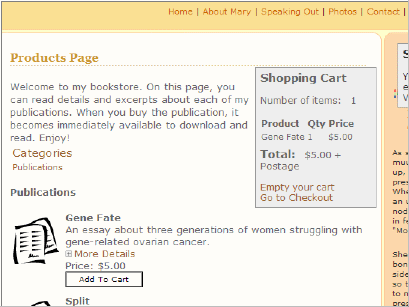
View the site

overley1

Like this post? Subscribe to the RSS feed RSS Feed.


Related Posts


AddThis Social Bookmark Button

Comments

You can leave a response, or trackback from your own site.

28 Responses to “WordPress Shopping Carts”

  1. Hi Guys, The above image is just one of the “shopping cart” presentation options. Assuming that your wordpress theme follows the wordpress theme guidelines then you can move the cart to your sidebar.php by clicking a button in shop options.

    Actually I think that in the latest version it displays in the sidebar.php by default.

    With a little more PHP and CSS experiance you can come up with all sorts of cool and funky looking e-commerce sites.

    Some examples are on our site:
    http://www.instinct.co.nz/e-commerce

    More info can be found in the forums:
    http://www.instinct.co.nz/blogshop

    Here are some visual tutorials on Flickr:
    http://www.flickr.com/photos/41894169159@N01/

  2. Thanks for leaving a comment! It’s great that you are so aware of incoming links.

    I looked for ways to style the shopping cart, but I’m drawing a blank. I looked at the Flickr photos, but they weren’t in depth enough.

    For example, how would I change the text that says “Visit the Shop”?

    Also, once you add to the cart, there are three links that appear:
    > Make Payment
    > Continue shopping
    > Empty shopping cart

    I would like to style them so that they look more like links.

    Overall I am pretty happy with the shopping cart plugin. I just wish there were an easier way to style it. Thanks for making the plugin available.

    One more question. How do I rearrange products within a category? It seems like they are arranged in the order they were entered, and it’s not possible to reorder them.

    Thanks for your help.

  3. Hi could I trouble you to be so kind as to explain to me how you got the products and the cart to show up? I’ve followed all the instructions but nothing will show. All the pages are blank!

  4. If you go to eCommerce > Shop Options, under Presentation Settings, select the Page radio button. Then look at the URL Settings above. Those URLs are where the shopping cart appears. You can change the URLs so that the cart appears on pages you specify. I can’t remember if you have to actually create the page first or not.

    If under Presentation Settings you select the sidebar radio button, the shopping cart automatically appears in your sidebar.

    If the cart still doesn’t appear on the page or sidebar, try selecting the manual radio button and putting the <> code into one of your pages. Make sure you turn off the visual editor before you stick the code in.

    Also, make sure you have defined some products and categories, and of course activated the plugin.

    As a technical writer, I plan to one day write instructions for this plugin, but being that it would be absolutely nonprofit, I may never get around to it. Let me know if you have any success.

    Tom

  5. Thanks Tom,

    I’m following this post. If you could write some technical documentation that would be fantastic!!! Not only would I appreciate it but I’m sure the whole WP e-Commerce community would appreciate it :)

    Ciao,

    Dan

  6. I may not get to it for 3 months, but it’s on my to-do list.

  7. Hi again. Thank you very much for your advice. However I am still unable to get it to show up. It works perfectly fine creating products and categories but nothing will show up on page itself.

    I’ve created the pages and am using the default urls for shop options. I followed the instructions to a T - I simply cannot understand why it doesn’t work.

    I’m using v3.4 on WP2.1, but on the plugins list on the WP homepage the most recent known version that works with 2.1 is v3.3beta - is this the cause of my problem?

    Thank you very much once again and sorry to be such a bother!

  8. I’m not sure about the compatibility of the different versions. You might want to try v3.3beta and see if it fixes it. If so, then you know it was a compatibility issue. If not, you know it’s a configuration problem. Sorry I can’t be of more help to you.

  9. Hey Guys,

    Check out the latest version of WP e-Commerce.

    >> http://www.instinct.co.nz/e-commerce

    Ciao,

    Dan

  10. Thanks for the update, Dan. It’s great to see that the e-commerce cart has been enhanced.

  11. [...] (continues) [...]

  12. Hi

    There is an wordpress shopping cart that works great with Paypal (Website payments pro, and website standard payments), Google Checkout, and Authorize.net, so great for accepting credit cards as well.

    Generates hacker-proof download links for digital products.

    Uses your own Paypals default settings (not IPN), so you can use it on many sites at the same time.

    Also has built in affiliate management if you want to run an affiliate program, as well as ad/link tracking.

    Not just for Wordpress either. You could use on almost any web page.

    http://www.wordpressshoppingcart.info (aff)

    Great blog here. I absolutely love the simplicity of its theme.

    Cheers

    Alan

  13. Kramer auto Pingback[...] Pingback by Tech Writer Voices Blog » Blog Archive » WordPress Shopping Carts [...]

  14. I am having trouble with the shopping cart on my site http://www.fishingreeldealz.com and if anyone can help me out that would be much appreciated. It is a wordpress plugin on version 2.3 Any Help?

    Thanks,

    Matt

  15. I can not get the gold option to work on mine, tried both the stable and latest beta.

  16. I am also having problems with the cart, I can not get the gold option working. Was going to upgrade the rest of the way but now thinking about other options.

  17. You should visit the plugin author’s site for support. I haven’t downloaded the latest version because none of my sites require a shopping cart. Another good place for support is wordpress.org/support. Good luck.

  18. Thanks I have done that, forum not very active and I emailed them. Still having the same problem.

  19. Sorry to hear that. Maybe try a different plugin. Or just use paypal buttons directly.

  20. Hi,
    Wow, I am sure to check this one out!!

    Bas
    Webmaster Motortassen

  21. Wow,
    Anyone has a store up and running based on this tool?

    Bas
    Webmaster Motortassen

  22. links from TechnoratiWordPress Shopping CartsCreating a static home page, and having the blog area available from another link. Integrating the e-commerce lite shopping cart.

  23. Sorry, I don’t know many. I made a tiny little store — the one I linked to in the post. I think the plugin is fairly popular, though. And they have made a lot of improvements since I wrote this post.

  24. Hi Guys. Wow yes the plugin has come a really long way since this thread was started way back in Jan 2007. It seems like a life time ago!!!!

    We just released WP e-Commerce 3.6 Beta 12 two days ago. Its had over 40 bugs fixed that were posted in our forums and tons of new features.

    I hope it works for you. If you get stuck the best place to go for help is probably the WP e-Commerce Forums.

    Ciao,

    Dan

  25. Opps. Forgot to post a link to the latest files.
    - Download 3.6 Beta 12

    Ciao, Dan…

  26. this is such a simple question, but how do you add specific product categories to specific pages?

  27. I Upload e-Commerce 3.6 RC2 to WordPress 2.5. I can not get the gold upgrade to work. The upgrade read me file States

    “Copy the contents of the zip file (a folder called gold_cart_files) into the wp-shopping-cart folder.

    The zip file folder contains a #1 folder (called gold_cart_files)and that folder contains a 2nd folder (called gold_cart_files.;-| Which one do I put into the wp-shopping-cart folder? I put #1 folder in and it did not work.

    Then the directions go on to say

    “Now it should automatically display a new tab called gold options, once you have entered in your API key all of the additional gold features will unlock”. Did not work;-(

    Then the directions go on to say “If it does not appear straight away you might need to deavtivate and then reactivate the e-commerce plugin”. Did that and it did not work.

    I also purchased Grid view upgrade. That zip file came with no read me file.

    I then Unloaded everything including the database and reloaded everything. Still the gold option did not work…..

    Aneyone have any Ideas on how to get this to work! Help

    PalmBeachs last blog post..Hello world!

  28. Thank you for theme.

Leave a Reply
