


The Challenge of Web 2.0 Documentation: WordPress's Immense Codex
What happens when you have the ultimate open-source application, used by thousands, with tasks simple and complex. Everyone contributes to a wiki or some other collaborative tool -- and the result is a giant mess where no one can find anything except by keyword searches.
This is the predicament of the WordPress Codex. Initially it may have included only one section, but it grew, and grew, and grew. And WordPress is still new.
Let's say you're just starting out with WordPress. Would you be intimidated by ... "The Codex"? Here's the home page of the Codex.
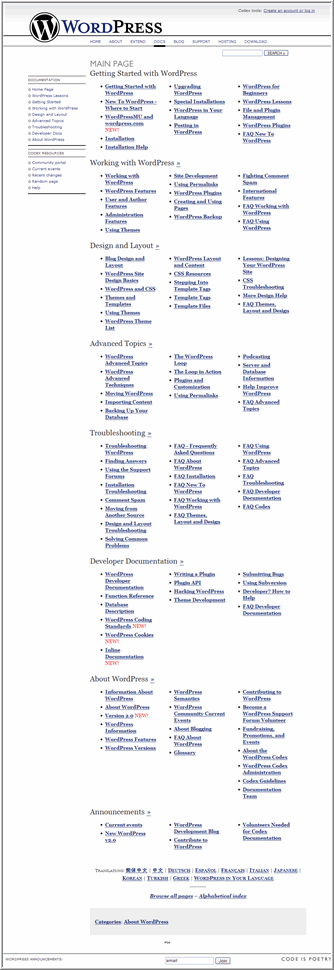
I had to actually use the Snagit scrolling window capture to grab that. It's immense.
What is the solution to organizing massive amounts of user-contributed information? As Web 2.0, open-source applications, and user communities proliferate, these questions will become more pressing. This is essentially WordPress's own wikipedia. I think that ultimately such large databases of information will only be searched by keywords. So each post/entry should have ample keywords. (Microsoft Word seems to offer its help documentation by keyword as the default.)
However, there's another technique -- one that hasn't been explored. WordPress allows you to do some single-sourcing in ways that might prove to be very useful. Each post or page has a unique ID. Similar to server-side includes, you can call and compile the content from a post/page ID onto a different page -- essentially single-sourcing your documentation.
Perhaps help administrators can select sets of documentation appropriate for different types of users -- beginner vs. advanced, developer, designer, etc.
I will be exploring this more later.
I'm actually not sure what the Codex runs with. I assumed it was WordPress, but it functions similar to a wiki. I've never actually contributed to it, though I've used it dozens of times.
About Tom Johnson

I'm an API technical writer based in the Seattle area. On this blog, I write about topics related to technical writing and communication — such as software documentation, API documentation, AI, information architecture, content strategy, writing processes, plain language, tech comm careers, and more. Check out my API documentation course if you're looking for more info about documenting APIs. Or see my posts on AI and AI course section for more on the latest in AI and tech comm.
If you're a technical writer and want to keep on top of the latest trends in the tech comm, be sure to subscribe to email updates below. You can also learn more about me or contact me. Finally, note that the opinions I express on my blog are my own points of view, not that of my employer.