


Make your computer run faster by disabling all the auto-startup programs
December 27th, 2006 | Posted in Web Design 19 Comments »
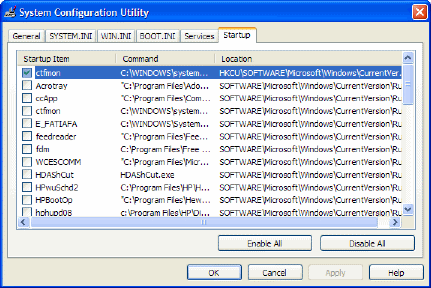
Do you have about 20 programs in your start-up folder? Check out the little icons near your computer’s clock. That’s the system tray. Whatever is in there starts up when your computer starts up — and consequently makes your computer slower. You can improve the performance of your computer pretty easily by doing the following:
- Go to Start > Run.
- Type msconfig and click OK.
- Click the Startup tab.
- Clear all the check boxes.
- Click OK.
Twitter
Facebook


Hey! Do you read Lifehacker?! I just did this the other day after reading a spot on it at Lifehacker. I left my anti-virus software, IM, and printer drivers, but was finally able to disable half a dozen unnecessary startup programs and now I boot up five times as fast. It’s grand!
I don’t know about Lifehacker, but I’ll have to check it out. Thanks for the tip. A friend of mine was using my computer the other day and said it was running slow. He blamed it on all my icons in my system tray and showed me how to disable them.
By the way, how do you read blogs? Do you have a feedreader or a feed aggregation page that you check?
Actually, I’m old-fashioned (for a blog reader). I list the blogs I read most commonly on my own blog, and most mornings I spend half an hour following the links and reading the blogs that have new posts. I tried using a feed reader a couple of years ago, but I missed *seeing* the blog when I read new posts, if that makes any sense.
I’ve deliberately kept the number of blogs I read regularly down to a minimum, because I prefer to read a few blogs thoroughly than to scan a bunch of blogs. I follow links outwards and if I find myself reading a new blog regularly, I’ll sometimes add it to my daily list.
There was a post about this on 37 signals’ blog a while back — I couldn’t find it in the archives, but they were discussing how RSS feeds have sort of depersonalized the blog reading experience, and some of those who used aggregators admitted they did miss seeing the blogs they were reading. It made me feel not *quite* so weird for reading blogs the way I do!
I think your method is a good one. I am subscribed to about 30 different technical writing blogs, another 30 technology blogs, and about 30 podcast feeds. I use FeedDemon to read them, but I end up doing more scanning than anything else.
Serious bloggers follow hundreds of different feeds. I’m not sure how they do it. I think you’re absolutely right about the personal aspect. It is more fun to read a blog in its original format, and also to interact with it more.
But if I unsubscribed to all my feeds, I’d feel like I was missing something.
i think some of them are reaaly essential.so i can’t disable all.
jack’s last blog post..Bilvanis
http://www.pcsafetynow.com. Their software has got my computer running fast again and protects from viruses and identity theft while I am surfing the internet.
There is something else you can type in “run” and it brings up a manager that you can tell the computer to auto start these or just leave or put them in manual. I went to it once but can’tr remember what it was. anyone know?
sometimes some malicous malwares also add themselves to auto-startup programs , so it’s very important to us to monitor it all the time
pass overs last blog post..IBM Invests Nearly $400M on Cloud Computing
That’s always a great tip. So many people wonder why their computers slow down or time but they don’t realize it’s all those programs they have running in the background.
http://gabwith.us/keeping-your-computer-safe-from-hackers-and-identity-thieves/
what’s hardest is striking a balance between keeping your computer safe with all the right protection software, while keeping it running smoothly.
Yes some of them have to be there..
Try out http://www.pcsurgeon.synthesite.com its was only $9.99 and came with
Anti Virus, Spyware and a hard disk defragger. Also came with a
tutorial that included tips and tricks to keep your computer fast,
healthy and up to date. I was pretty impressed. This is all you really
need to clean your computer of any viruses and spyware and keep it
protected and running like its brand new.
You rock. World needs more souls like you.
Its also sometimes a good idea to click on Services tab, Hide all MS services and close all non-MS services. I usually do this, you just have to be careful not to close a third party display driver service!
Sure, the computer starts faster. But is it really a good thing? Some of the programs running there are doing a good job. That is of course if you installed them for the proper reason and not just for occasional usage. As far as the services go, i wouldn’t touch that unless i know what they are or at least take the time to find out what they are.
Many people think that a crack in their car windshield means an expensive windshield replacement, or other costly auto glass repair. The fact is, technology has come a long way in recent years and this is another area where the do-it-yourself mindset has taken hold! To help repair an unexpected crack or chip on a windshield yourself, you can simply use a readily available windshield repair kit.
Windshield Replacement
Thanks.I will try it on my computer because I found it’s a little slow after install some softwares.
My pc is so slow, cant wait to try it!
Advantageously, the article is actually the greatest on this laudable topic. I concur with your conclusions and will thirstily look forward to your incoming updates. Saying thanks will not just be adequate, for the phenomenal clarity in your writing. I will immediately grab your rss feed to stay informed of any updates. Good work and much success in your business dealings!
