
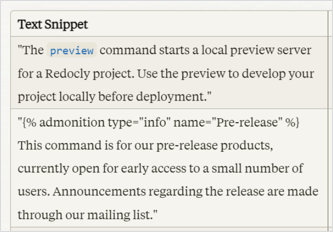
In this guest post, Diana Cheung explores how to learn AI by using deliberate practice to enhance her prompting skills. As a deliberate practice effort, she emphasizes intentional, systematic practice rather than mindless repetition, similar to how one would learn coding or other skills. In this post, she shares her attempts at using Claude.ai to work through editorial improvements to a GitHub project's API documentation.
Documentation scripts perform processes such as building reference documentation or doing other repeated processes with docs. This tutorial builds on the conceptual content in Use cases for AI: Develop build and publishing scripts. In this tutorial, I get more specific with strategies and techniques for prompts, walking through a prompt to build a script for generating reference docs.
Zoomin recently released a Technical Content Benchmark Report for 2024. This report explains the company's second benchmark report on documentation metrics, which analyzes data from 97.6 million user sessions across 136 countries. The report provides insights into average metrics like page views, bounce rates, time on page, GPT search usage, and more. In this Q&A with Rita Khait from Zoomin, she discusses how to interpret and use these benchmarks to set goals, improve content findability and performance, and demonstrate documentation's value to stakeholders and the business.

At the start of the year, I wrote a trends post and noted uncertainty about the directions AI will take tech writers this year. (See My 2024 technical writing trends and predictions.) Now that we're into April, I have a better sense of how things are going and wanted to provide an update here. My main observation is that AI is accelerating my technical writing output, making me about twice as productive as before. Also noted in this post: prompt engineering is a non-obvious skill that many tech writers still struggle with, even though documentation is more within AI's sights than creative content.

There's an upcoming conference called AI The Docs 2024: API Documentation and AI Best Practices, held April 3, 2024 online. The conference is put on by the same API the Docs group / Pronovix that holds other online conferences and events. I'll be one of the speakers. I'm planning to talk about prompt engineering.
A powerful way to reduce hallucination with AI tools is to supply an abundance of source material for the AI to draw upon. This article explores best practices for gathering and organizing that source material. I argue that you should be selective in what you include, preferring quality over quantity. Organize basic information first, then more advanced details. Include the reference output and any meeting notes.
In this article, I describe a method to use the AI to fact-check its own output against source materials. The better your source materials, the more likely you'll be able to identify errors. However, even with this method, human review by SMEs (subject matter experts) is still necessary. Unfortunately, getting SMEs to thoroughly review drafts can be difficult. Additionally, SMEs have such specialized knowledge, it's easy for one SME to LGTM a doc without having 100% certainty about each part.
In this post, I chat with Keren Brown at Zoomin Software about best practices for integrating AI with documentation. Keren emphasizes the importance of first making your content AI-ready, which means ensuring that it's accurate and up to date, before incorporating AI features. We discuss the reasons companies adopt AI, how to overcome implementation challenges, common mistakes, creativity vs. hallucination, consolidating content, user behaviors, security concerns, and measuring success.

How can you persuade potential employers about your API expertise? One of the strongest moves you can make is to share a link to your portfolio. The following is a guest post by Peter Gustafson, a technical writer who's had a lot of success with API documentation projects at many high-profile companies. I was chatting with Peter on Linkedin the other week about trends he's seeing in the field, and I asked him to write a guest post. In this post, he explains the importance of having an online portfolio that potential employers can easily access and browse.
I added another article to my prompt engineering series on reverse engineering prompts. Reverse engineering a prompt can mean a few different things, but in this article, I'm referring to deriving the likely prompt based on a given output. For example, you pass in some finished content and ask the AI to write a prompt that would produce a similar output. Although reverse engineering prompts might not be all that different from simply coming up with a template for docs, I added this article here to emphasize that you can get AI to write prompts for you, and many times these prompts are good. They can be much more detailed and robust than manually written prompts.
I added a new article to my prompt engineering series on populating documentation templates. In the article, I explain how to use AI to populate documentation templates with information that you've gathered. This technique can be a quick way to get an initial draft of documentation, which you can then edit and review with SMEs.
I added a new article about task decomposition to my prompt engineering series. This tutorial will help you understand task decomposition by guiding you through the process of creating a complex tree diagram that’s too sophisticated for an AI tool to create at once.
I added a new topic to my prompt engineering series on summarizing meeting notes. While using AI to summarize meeting notes might seem superficial, it’s not. When you tag people in meeting notes and broadcast the notes to larger lists of people, the notes can amplify your visibility and communication about the documentation projects you’re working on.
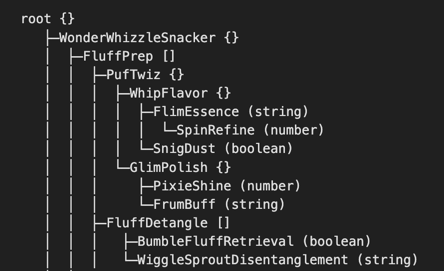
I recently visualized both a cloud and Java API through some complex tree diagrams that showed the objects returned, with all the detail inherent in the parent/child relationships and structures. One of the primary principles of prompt engineering is to break complex tasks up into smaller ones. This principle has at least two purposes: (1) most AI chatbots can't process large amounts of text, and (2) you can more precisely direct the output from smaller inputs.

I've begun a new favorite activity: walking and talking with ChatGPT. It might sound crazy, but it's really engaging. As I walk around for exercise, I usually listen to non-fiction audiobooks or podcasts. Particularly with non-fiction audiobooks, I listen to learn something. For example, today I was listening to The Little Book of Common Sense Investing by John C. Bogle, founder of Vanguard. After about 20 minutes of listening to the book, my mind tends to gravitate toward questions I have. When I find myself losing interest in listening instead want to pursue specific questions, I pull out the ChatGPT app on my phone, tap the headphone button to initiate the audio conversation, and start asking questions related to topics surfaced in the book.
