


Installing Multiple Versions of WordPress on the Same Account, But Masking Them to Appear as Different Domains
May 31st, 2007 | Posted in Blogging, WordPress 27 Comments »
If you have a web host, like Blue Host, you can have different domains (called add-on domains) that point to different subdirectories within your host account. In this post I explain how to set this up. It’s a bit confusing and I’ve never seen instructions on configuring this.
Let’s say I want to have two sites, one called johndoe.com and the other janedoe.com, and I only want to have one web host. The root domain of the web host could be anything, such as www.idratherbewriting.com (my domain). To set this up, here’s the basic procedure:
- Call up your web host and register two add-on domains, such as johndoe.com and janedoe.com. It may cost $10 or so to register them. Then it takes a day to kick in. Of course these add-on domains need to be available domains. I’m using johndoe and janedoe as generic examples.
- Tell them to point johndoe.com to subdirectory idratherbewriting.com/johndoe. Point janedoe.com to subdirectory idratherbewriting.com/janedoe.
- Now go into your host’s cPanel, and use Fantastico to install WordPress in the two add-on domains. In the Install in Domain drop-down box, select johndoe.com. Leave the Install in Directory field blank. The fields should appear as follows:
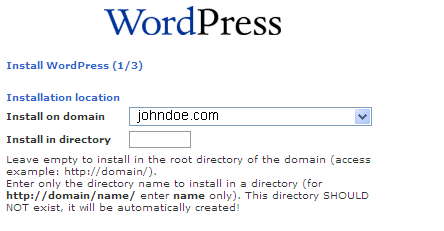
When WordPress installs, the add-on domain folder will appear in the public_html folder in your file directory. So if you access your file directory via FileZilla (or some other FTP program), and then go to /public_html, you’ll see a folder called johndoe. That’s where your WordPress files are installed.
Within the WordPress admin dashboard, go to the Options tab and you will see that your add-on domain appears in both the WordPress URL and the Blog address (URL) fields.

You can log into your add-on domain blog by going to johndoe.com/wp-admin.
Users will be able to go to johndoe.com and janedoe.com and navigate them without realizing that they are really subdirectories under idratherbewriting.com.
Special thanks to Ryan at BlueHost tech support for walking me through this. Support at BlueHost is excellent, which is probably why they’re at the top of the recommended hosts list at WordPress.
Twitter
Facebook


http://www.idratherbewriting.com/2007/05/31/installing-multiple-versions-of-wordpress-on-the-same-account-but-masking-them-to-appear-as-different-domains/http://www.shouthead.com/legacy/how-to-setup-multi-blogging-with-wordpress-20.html
Some links that i found usefull. http://coderseye.com/2005/wordpress-2-multi-blogging-made-easy.html http://me.mywebsight.ws/2006/08/11/host-multiple-wp-sites-on-one-installation/http://www.idratherbewriting.com/2007/05/31/installing-multiple-versions-of-wordpress-on-the-same-account-but-masking-them-to-appear-as-different-domains/http://www.shouthead.com/legacy/how-to-setup-multi-blogging-with-wordpress-20.html
[...] Original post by Tom [...]
Those who don’t use the same web host might be confronted with different jargon. I believe the common terms for pointing a domain name to a specific directory are “HTTP Redirect” on the DNS side, and “Virtual Host” (or “Virtual Directory”) on the web server side.
I’d never heard of Fantastico until now! Nice little configurator app! Here’s the URL for anyone who cringes at editing text files: http://www.turtlepop.com/wordpress-howto.php
Hi! I bookmarked this post because I’m about to go through this exact same process.
I’m also going to stumble it.
Thanks for the information!
[...] Your page is on StumbleUpon [...]
Brian, thanks for clarifying the terms and for the link. Fantastico is definitely a cool tool.
Laura, let me know how it goes. I have to admit that I wrote this post after a long phone call with tech support. I initially went about this the wrong way, and fixing it was hard.
I initially installed a blog in a subdirectory, and then later thought, I’d like X domain to point to it. This was a backwards way of doing it, I later learned.
Let me know if it works. As always when you try new things, back up your database and files first.
You’d think this process was more common, and that instructions would be everywhere, but they aren’t. I am planning to offer hosting for some friends and others, and needed to learn to do this.
You can also provide password-protected FTP access to the subdirectory.
Fortunately I have BlueHost also. I plan on using your article first. If all else fails, they are pretty good about walking you through the process.
Anyway, your piece answered some areas that I was wondering about.
[...] http://me.mywebsight.ws/2006/08/11/host-multiple-wp-sites-on-one-installation/ http://www.idratherbewriting.com/2007/05/31/installing-multiple-versions-of-wordpress-on-the-same-ac... [...]
[...] http://me.mywebsight.ws/2006/08/11/host-multiple-wp-sites-on-one-installation/ http://www.idratherbewriting.com/2007/05/31/installing-multiple-versions-of-wordpress-on-the-same-ac... [...]
I am researching hosting options and possibilities for WP. What I am needing is not for different domains, but for subdomains. Would it work the same way?
blog.bilinguality.com
clients.bilinguality.com
and I need these to point to different blog data and themes with only one WP installation. Is this possible?
You know, I think the subdomains are not tricky at all. I haven’t worked much with subdomains, so I will refrain from giving advice. Sorry I can’t be more help — try searching the Codex and then the support forums. Try a google search like this: site:www.wordpress.org/support subdomains.
Hi:
I have the same question as Mari has. I do have a Subdomain1 where WP is already installed as custom installation and not through Fantastico which is not up-to-date I believe. Now I need another WP sub-domain2 on the same domain with a fresh WP blog. How can I change the existing WP code on subdomain1 to use that installation for my subdomain2 without of course ruining things on subdomain1 ?
Very helpful info here. Thanks
Santosh, I’m not sure why you need to do a custom installation on your second subdomain using the same code as your other. You may have customized a theme or something. Just download your theme files. Install wordpress fresh in your new subdomain, and then upload your customized theme into wp-content/themes and select it in the theme editor. Remember to use the wordpress forums at wordpress.org/support. Good luck.
[...] be useful for you: Wordpress 2 Multi-Blogging Made Easy Host Multiple WP Sites On One Installation Installing Multiple Versions Of Wordpress On The Same Account But Masking Them To Appear As Differen… Sphere: Related Content Read More Post a [...]
Best wordpress and other script hosting . Very good customer support too. 24/7 excellent service. Visit it >>> http://vorlehost.com
nice post, it was pleasure to read it, it was informative and usefull!
also check out new free hosting site with no ads 455mb.com
Thank you
Thanks to the article, Now there is more reason to comment than ever before! Everyone should participate. I am incorporating what your wrote to our project!
Very good post. Keep up the great work. Thanks again, Guadalupe
Hello I am just looking around many different websites that offer domain names. Well this is rediculous on how many people out there charge you for so many items that don’t need to be bought and still get the same quality as the paid for sites. I have found out that all you need to really pay out is max $10 year and no more for any product on domain names. And you can get free hosting, website design programs, free personalized emails, free blog account, and free online picture site. ALL WITH A $10 PAYMENT. So don’t waste your time on paying anymore for what you need unless you are running a huge website. And still it shouldn’t cost more than $89.00 Year. By the way if the Blog owner lets me post this I have settled down with http://www.rnrstuff.net. But there are other like this site here that seem real nice. But Beware the Domain BIZ is still very young and it is still got alot of growing so get it while its young.
I like the simplicity of what you wrote. I have written some similar instructions, but I made them too complex. I will either rewrite my own, or refer to yours, and give you credit for the advice.
Thanks,
G.
Greg, thanks for the note. I’m glad you found the instructions helpful in some way. A lot of times my blog serves as a knowledge store of things I need to remember.
One thing that I discovered is that once you get the server ID or digital location, if you type the numbers into a Google search, the domain will be activated faster, almost immediately.
You may want to incorporate this into your instructions for those of who are impatient and do not want to wait 24-48 hours.
Greg, thanks for the tip.
I m not using wrodpress, i m tied with blogspot and i heard some more advantages wordpress can give in other so thinking to redirect myself to wordpress. Anyways thanks for the helpful tip.
Hello, I just wanted to let you know I have subscribed to your RSS feeds because of your astounding site layout
. But truthfully, I have found your site has the cleanest set up I have stumbled upon. It really makes your webpage easier to browse through. Well I’m only supposed to be looking at work related stuff now, I’m at Hawaii Flooring I revisit when I’m free.
