


WordPress 2.2 -- Here's Why It's Worth the Upgrade
WordPress 2.2 is definitely worth the upgrade. After my backup and restore issues the other night, I had a problem-free upgrade this time. The wp-cache plugin was what threw a monkey wrench in the upgrade before. Is WordPress 2.2 worth it? Yes. Here's why:
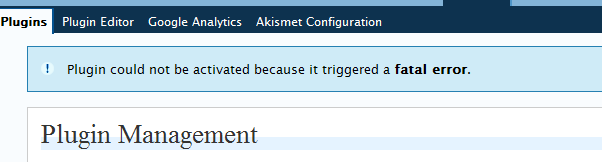
In previous versions, WordPress let you pull the trigger on a loaded gun. You might activate a plugin that ends up crashing your blog. Now they've made it foolproof by preventing fatal errors from executing.
What plugin was I activating, you ask? Widgets. They are no longer needed because widgets are now integrated into the core -- very smart move. These two moves (fatal error prevention and widget integration) contribute to usability and lessen the learning curve.
Other than that, here are some other new features of WordPress 2.2:
- You can deactivate all plugins at once.
- On the Comments tab, you can see the title of the post the comment belongs to.
- You can choose to display your categories as a drop-down list.
- It seems quite a bit faster browsing and loading the pages on the administrative end.
- The feed has Atom support.
- The More tag works better.
You can also import from Blogger. So if you started your blog in Blogger because you just wanted an easy lift-off into the blogosphere, but now feel that you need a more powerful tool, you can move to WordPress with an easy import.
Here's the full list of features from WordPress 2.2 release notes.
A Vista vs. WordPress Reflection
I've had Vista at work now for a month. While I like the new OS, I can't say it's that life-changing. Mostly it's just doing the same things a little different way. I get much more excited about WordPress upgrades. The tools do completely different things, granted. And I am fond of Vista. Still, somehow WordPress has an allure that has captured me. It's more than software -- it's joining a revolution. Vista is just a Microsoft product.
I once saw a Microsoft ad for Vista that said, "The Next 8 Hours Are Going to Be Very, Very Different." That's totally true, but after those 8 hours are up, uhm, the wow dies down. All the wow quiets down except for the RSS feedreader gadget, which is totally distracting, addicting, and fed by tools like WordPress.
About Tom Johnson

I'm an API technical writer based in the Seattle area. On this blog, I write about topics related to technical writing and communication — such as software documentation, API documentation, AI, information architecture, content strategy, writing processes, plain language, tech comm careers, and more. Check out my API documentation course if you're looking for more info about documenting APIs. Or see my posts on AI and AI course section for more on the latest in AI and tech comm.
If you're a technical writer and want to keep on top of the latest trends in the tech comm, be sure to subscribe to email updates below. You can also learn more about me or contact me. Finally, note that the opinions I express on my blog are my own points of view, not that of my employer.